In depth
A closer look at Root Firewall
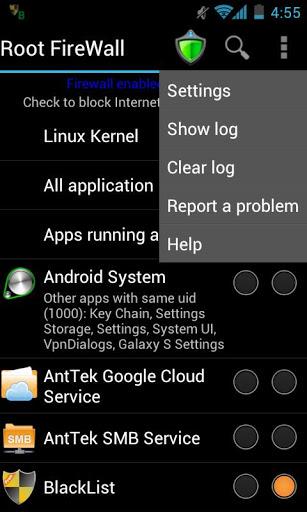
This is the best choice to ad-blocking, prevent data over-billing, save battery life, as well as protect your privacy Feature: . Block Internet access for any apps: . Separate 3G and WiFi data . One-click widget enabled . Test blocked app in a touch Requirements . Rooted devices More details . Block Internet access for any apps: One can select to block a selected application or applications, application running as root. Since it blocks Internet access per application ID (UID in regular Linux system), several applications may be assigned the same ID, you should block all of them or nothing. . Separate 3G and WiFi data For each application, you can select to block Internet access via either 3G or WiFi channel. It s extremely helpful if you dont have an large data plan. It saves you from over-billing because of background application accessing Internet such as Google+, Google Play. . One-click widget enabled One-click widget is the easiest way to toggle blocking status. Its useful when you dont want to use data connection and occasionally turn it on for a while. . Test blocked app in a touch Once you block an app, tap on it to see if the application can access to Internet or not.
Verdict
Should you install Root Firewall?
Root Firewall is an Android application available under the
Freeware
license.
We’ve catalogued it under
Productivity.
✓
Verified clean. Every Root Firewall APK on SoftLookup is scanned for malware, spyware, and adware. We re-test on every update.
Sponsored
At a glance
Root Firewall specifications
- Publisher
- Developer
- Last updated
- May 5, 2026
- License
- Freeware
- Operating system
- Android
- Price
- Free
- Page views
- 765
Sponsored
Help fellow users decide. Share your experience with Root Firewall.