In depth
A closer look at AutoGuard Blackbox - Dash Cam
AutoGuard, the best Blackbox application, will give you marvelous experiences.
ey Features
(Pro) Background recording: Multitasking with other apps (like navigation)
Upload videos on YouTube.com with captions for location and time information
Capture photos at important situation automatically
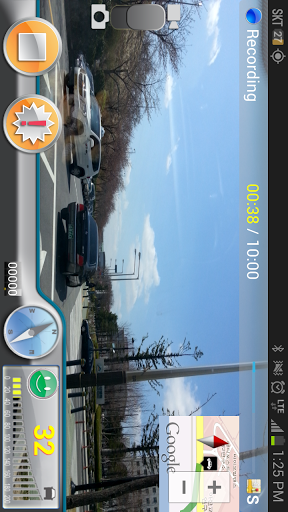
Show the video and map information on one screen
Automatically starts video recording when put into car dock or connect with bluetooth devices
Records driving video, speed, GPS, and nearest address
Supports high resolutions (1080p, 720p)
Traces path driven on 3D Google maps
Snapshot (supports auto focus, flash & gallery)
Send recorded information via E-mail
AutoGuard records various lengths of video, acceleration, latitude, altitude, and speed.
The video recorded can be limited to save space on your phone. After the space is filled it will automatically delete the oldest videos, unless marked to be saved.
AutoGuard Pro can be set to automatically start when placed in a car dock and run in the background.
You can adjust video resolution, bitrates, the sensitivity of the accelerator, and GPS update time.
Pro Version is ad free (AutoGrard Pro Unlocker)
Verdict
Should you install AutoGuard Blackbox - Dash Cam?
AutoGuard Blackbox - Dash Cam is an Android application available under the
Freeware
license.
We’ve catalogued it under
Productivity.
✓
Verified clean. Every AutoGuard Blackbox - Dash Cam APK on SoftLookup is scanned for malware, spyware, and adware. We re-test on every update.
Sponsored
At a glance
AutoGuard Blackbox - Dash Cam specifications
- Publisher
- Developer
- Last updated
- Feb 9, 2026
- License
- Freeware
- Operating system
- Android
- Price
- Free
- Page views
- 1243
Sponsored
Help fellow users decide. Share your experience with AutoGuard Blackbox - Dash Cam.