In depth
A closer look at Vid Locker - Hide Videos
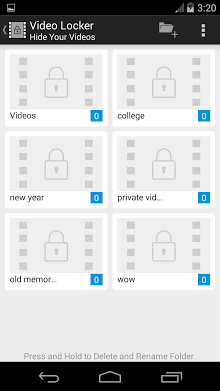
Video Locker- Hide Videos lets you hide videos and movies from your gallery into a private vault. Features Includes :- Hide app icon and launch video locker using phone dial pad ( default phone app )- Ability to backup all your videos in a zip file- Shake phone to exit app- Intrusion detection.
- Easy-to-use passcode access- Delete / unhide / move videos between albums / folders.
- Built-in Video Player for easy viewing.
- Disappears from recent apps list.
- Organize videos by creating multiple folders. Just create a passcode to hide videos and movies. Create multiple folders to organize videos into categories. Instant previewing and watching with built-in video player. Have ideas to improve the app , please do not hesitate to send us your thoughts. In case you face any problem with app. Please help us improve by contacting us at contact-xcstechnologies.com Fanpage : facebook.com/pages/Video-Locker/168579660019844
Verdict
Should you install Vid Locker - Hide Videos?
Vid Locker - Hide Videos is an Android application available under the
Freeware
license — the APK is 3.0M.
We’ve catalogued it under
Security.
✓
Verified clean. Every Vid Locker - Hide Videos APK on SoftLookup is scanned for malware, spyware, and adware. We re-test on every update.
Sponsored
At a glance
Vid Locker - Hide Videos specifications
- Publisher
- Developer
- Last updated
- Feb 13, 2026
- License
- Freeware
- Operating system
- Android
- File size
- 3.0M
- Price
- Free
- Page views
- 637
Sponsored
Help fellow users decide. Share your experience with Vid Locker - Hide Videos.