In depth
A closer look at NQ Family Guardian
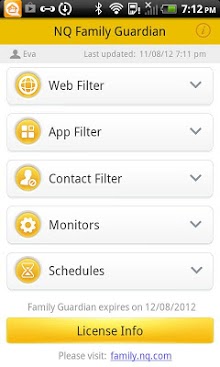
NQ Family Guardian, used with our web portal, allows parents to monitor their childrens location and smartphone usage and manage how kids use their devices. Install the app on your childs phone to monitor their smartphone activities, including web browsing, app downloads, photo libraries, contacts, text messages and more. With Family Guardian v1.8 we have made a number of feature enhancements, making our app even better! Download NQ Family Guardian for a 30-day FREE trial! Subscribe for US $4.99 per month. Award-winning Parental ControlsParent Tested Parent Approved Seal of ApprovalNational Parenting Publications Awards-HonorsRecipientBest Mobile App Awards-PlatinumAwardInternational Business Awards-GoldAward for Best New Software Product or Service of the Year Features: Web Filter: Block inappropriate websites. App Filter: Make smart choices about which apps your children can download. Contact Filter: Prevent harassing calls or texts by blocking certain numbers. Monitors: eep track of your childrens locations, messages, calls, browsing histories, apps, and photos. Schedules: Control your childrens smartphone use by setting up times when they can make calls, browse the web, text, and play with apps. Geo-Fences: Set up safe zones for your children and receive messages when theyre outside their zone. Parent Portal: Checking up on your kids is as easy as opening a browser window! Our portal lets you monitor your childs smartphone activities and change their settings, without ever needing to pick up your childs phone. Locate/Check-ins: Encourage your kids to tell you where they are by using an easy check-in function on their smartphones. You can also locate them if they forget to check in. Panic Alarm: If your kids are in trouble, they can press the Panic Alarm button to send an alert message with their exact location to your phone. Get started in 3 simple steps: 1. Download and install the NQ Family Guardian app on your childs smartphone and follow the instructions in the setup wizard. 2. Sign up for an NQ account as part of the setup wizard in the app, or at family.nq.com. 3. Sign in at family.nq.com to see your dashboard and view your childs recent activities. Having-The TalkBefore you set up NQ Family Guardian, download our ids and Smartphones Toolkit (nqmobilefamily.com/familycontract). Developed with the National Cybersecurity Alliance, the kit includes tips to help parents and kids learn about how to stay safe when using your smartphone. Use our Mobile Family Contract so you and your kids can have a clear agreement about appropriate smartphone use. We want to hear your thoughts Love it? Please take a moment to add a review to the Play Store. Problems? Contact us at help-nq.com. With your help well continue to make NQ Family Guardian the best solution for parents and their smartphone loving kids. eep in touch with the NQ Mobile team.
Verdict
Should you install NQ Family Guardian?
NQ Family Guardian is an Android application available under the
Freeware
license — the APK is 2.7M.
We’ve catalogued it under
Security.
✓
Verified clean. Every NQ Family Guardian APK on SoftLookup is scanned for malware, spyware, and adware. We re-test on every update.
Sponsored
At a glance
NQ Family Guardian specifications
- Publisher
- Developer
- Last updated
- May 3, 2026
- License
- Freeware
- Operating system
- Android
- File size
- 2.7M
- Price
- Free
- Page views
- 785
Sponsored
Help fellow users decide. Share your experience with NQ Family Guardian.