In depth
A closer look at Titanium Backup - Root
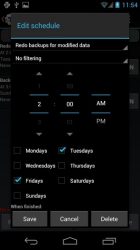
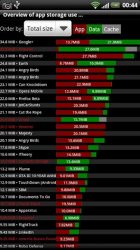
Titanium Backup is the most powerful backup tool on Android, and then some. You can backup, restore, freeze (with Pro) your apps + data + Market links. This includes all protected apps - system apps, plus external data on your SD card. You can do 0-click batch - scheduled backups. Backups will operate without closing any apps (with Pro). You can move any app (or app data) to/from the SD card. You can browse any app-s data and even query the Market to see detailed information about the app. Also see the paid PRO key which adds EVEN MORE awesome features such as:[-] 0-click batch restores[-] eep multiple backups per app[-] Backup/restore SMS,MMS,calls,bookmarks,Wi-Fi AP as XML[-] Multi-user app data[-] Apps freezer[-] Sync to/from Dropbox (manual/scheduled)[-] Sync to/from Box (manual/scheduled)[-] Sync to/from Google Drive (manual/scheduled)[-] TB Web Server: download/upload your backups as a single ZIP on your computer[-] Convert user apps <=> system apps[-] Integrate system app updates into ROM[-] Encryption[-] Market Doctor (relink apps to Market)[-] -Destroy all Market links- feature[-] Hypershell speed[-] Backup apps without closing them![-] Create your own update.zip containing apps+data![-] Restore individual apps+data from non-root ADB backups![-] Restore individual apps+data from CWM backups![-] Restore individual apps+data from TWRP backups![-] Market -auto updating- manager[-] System logs cleaner[-] Dalvik cache cleaner[-] Integrate Dalvik cache system elements into ROM[-] large schedules[-] Load/Save a Filter and use it in Widgets/Schedules[-] Change the device-s Android ID, restore it from a backup or after a factory reset[-] Protect backup against deletion[-] Send backup (to e-mail/cloud) and import it in 1 click[-] Backup’Verify’Un-install an app in one shot[-] Freeze/defrost/launch apps in a single click[-] CSV export any app DB (e-mail or Google Docs)[-] Convert app data to/from fast WAL format[-] WAY MORE!
Verdict
Should you install Titanium Backup - Root?
Titanium Backup - Root is an Android application available under the
Freeware
license — the APK is 7.56 MB.
We’ve catalogued it under
Security.
✓
Verified clean. Every Titanium Backup - Root APK on SoftLookup is scanned for malware, spyware, and adware. We re-test on every update.
Sponsored
At a glance
Titanium Backup - Root specifications
- Publisher
- Titanium Track
- Last updated
- Feb 14, 2026
- License
- Freeware
- Operating system
- Android
- File size
- 7.56 MB
- Price
- Free
- Page views
- 786
Sponsored
Help fellow users decide. Share your experience with Titanium Backup - Root.