
Android · Free download · Security
Call Blocker1.0.7
- Operating system
- Android
- File size
- 2.71 MB
- License
- Freeware
- Last updated
- May 5, 2026
73 downloads·665 page views
Android · Free download · Security
73 downloads·665 page views
Screenshots
In depth
Many Android phones provide call blocking capabilities. Why is-Call Blockerbetter? It has several core features that together provide strong protection against annoying calls. BLACLIST:
You can add any unwanted numbers to the-Blacklistfrom the calls log, contacts list or input the number manually. Also, by using-Begins withoption, you can block a range of numbers with certain first digits. BLOCING:
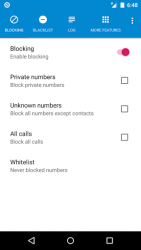
Using the options of this tab, you can block calls from private, unknown or all numbers. Also, you can turn on/off blocking with one simple tap. WHITELIST:
If you don't want to block calls from a certain number, adding it to the-Whitelistis sufficient. Callers from this list will never be rejected by the blocker. LOG:
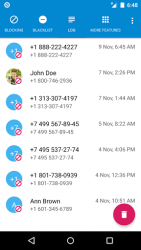
Call Blockersaves all blocked calls in the-Log, where you can always see who has been blocked. Moreover, the app contains features such as notifications about blocking and a status bar icon, both of which can be turned off in the app settings. You can obviously use your phone's built-in capabilities or even ignore such problem. However, if you are really tired of annoying calls, just try this blocker. FAQ:
How can I remove icon in the top of screen? Open the app's-Settings. Next select the-Notificationssection and turn off the-Status bar iconoption.
Verdict
Call Blocker is an Android application available under the Freeware license — the APK is 2.71 MB. We’ve catalogued it under Security.
At a glance
Help fellow users decide. Share your experience with Call Blocker.