In depth
A closer look at Cameraless - camera block
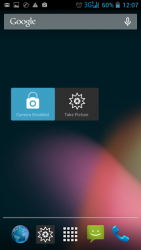
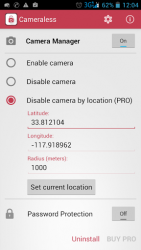
Cameraless is a camera blocker tool that protect the camera in your device.You wont believe how easy it is to use your camera remotely without your knowledge; to spy on you; stalk you; or harm you when you are not protected.Cameraless app blocks all cameras in your device, providing full protection against: Spies, stalkers, spyware and various malware Taking pictures/videos in secure areas. Cameraless is the perfect anti spy camera blocker application.There are two major functions:1. Enable / Disable camera manually.2. Enable / Disable camera automatically according to your location (PRO).Supported version: 4.0 and above (ICS,JB). Cameraless is also useful for those who work at secure environments.Don-t miss the PRO features with the camera blocker widget and the one click shortcut to activate the camera even when it is blocked. Features:3 modes (Enable, Disable, PRO By location)Auto launch after rebootDynamic notifications (for location mode)Extreme battery saving (the only mode)Quick uninstall functionAuto-sleep when screen is off (for location mode).Password protection24/7 anti spy securityControlling camera status widget (PRO)Camera activation shortcut (PRO)Location notifications (PRO) How to use- Click on -Camera manager- and activate it- Enable / Disable your camera or purchase the -disable by location- function.
- Disable by location: - Insert the center location (lat,lon) of the target area where your phone should be disabled. - If you are standing in the center of the target area you can click on the -Set current location- button and the center location will be updated accordingly. - Insert radius (meters) that your camera will be disabled within (around the center location). That is all your phone will become camera-less when you are in the target area and vice-versa. To remove location notifications, go to Settings->Apps->Cameraless and uncheck -show notifications-. Note:Cameraless was designed to consume negligible battery power, therefore the location aware function is based on your network location provider and will not use your GPS (Network location accuracy is widely variable and can sometimes be worse than 1500 meters, therefore setting a -camera disabled area- radius of 50-250 meters is effective only if there is an active wi-fi hot spot in the desired location, otherwise you should set a radius of at least 300 meters). For support (Forgot password, can-t uninstall, etc) please contact us by email and we will support you: manyeramanyera-gmail.com Download today the best camera blocker at the market.
Verdict
Should you install Cameraless - camera block?
Cameraless - camera block is an Android application available under the
Freeware
license — the APK is 3.83 MB.
We’ve catalogued it under
Security.
✓
Verified clean. Every Cameraless - camera block APK on SoftLookup is scanned for malware, spyware, and adware. We re-test on every update.
Sponsored
At a glance
Cameraless - camera block specifications
- Publisher
- Manyera
- Last updated
- May 4, 2026
- License
- Freeware
- Operating system
- Android
- File size
- 3.83 MB
- Price
- Free
- Page views
- 912
Sponsored
Help fellow users decide. Share your experience with Cameraless - camera block.