In depth
A closer look at PhoneGuard
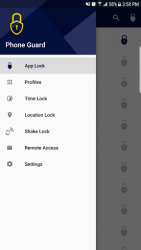
Phone Guard is the best way to protect your phone remotely. It is an App Locker or App Protector that will lock and protect your apps using a password or pattern. It also provides protection using remote control to your Phone (Via SMS, no internet connection is needed at the Device End): REMOTE ACCESS: How It works 1- Activate Remote Access functionality in Phone Guard application
2- Log in via Facebook
3- Go to: phoneguard dot mobileartsme dot com
4- Log in via Facebook with same account that you logged in from your device
5- You will see a list of actions, select what you need and send to your phone Phone Guard allows you to create profiles with predefined actions
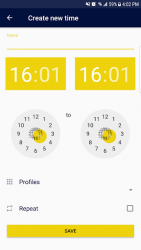
- Lock all or specific apps (Contacts, Messages, WhatsApp, Viber, Facebook, Skype, File Manager and Gallery)- Phone (Silent, Vibrate or Ringing)- Wi-Fi (On or Off)- Mobile Data (On or Off)- Bluetooth (On or Off)- Prevent Incoming Calls You can activate those profiles by: 1- Profile Selection2- Setting a time (from-to) to activate the profile3- Location (Close or Away from a specific Wi-Fi Hotspot)4- Shaking the Device Phone Guard FREE version:- Password, Pattern or fingerprint protection- Lock all or specific apps- Create profiles with predefined actions and possibility to activate the profile whenever you want Phone Guard Premium: Subscribe once, and sit back and enjoy all FREE - Premium features of Phone Guard.
- Monthly subscription, charges are applicable as per your subscribed plan with your telecom provider- Prevent Incoming Calls- Activate the Lock profile by: Shaking the Device Setting a time (from-to) to activate the profile Location- Remote access (Via SMS, no internet connection is needed at the Device End), Lock/Unlock for: Phone (Silent, Vibrate or Ringing) Wi-Fi (On or Off) Mobile Data (On or Off) Bluetooth (On or Off) Phonebook Lock (On or Off) Browser Lock (On or Off) All chat Apps: WhatsApp, Viber, Facebook, Skype Alarm Vibrate Backup call logs and messages Backup contacts List your apps Take front picture for the holder of your phone Text to speech Locate your device- Remove in-app ads
Verdict
Should you install PhoneGuard?
PhoneGuard is an Android application available under the
Freeware
license — the APK is 8.96 MB.
We’ve catalogued it under
Security.
✓
Verified clean. Every PhoneGuard APK on SoftLookup is scanned for malware, spyware, and adware. We re-test on every update.
Sponsored
At a glance
PhoneGuard specifications
- Publisher
- Special Applications
- Last updated
- Feb 9, 2026
- License
- Freeware
- Operating system
- Android
- File size
- 8.96 MB
- Price
- Free
- Page views
- 1043
Sponsored
Help fellow users decide. Share your experience with PhoneGuard.