Android · Free download · Security
AppLock2.22.2
- Operating system
- Android
- File size
- 4.16 MB
- License
- Freeware
- Last updated
- Feb 6, 2026
79 downloads·866 page views
Android · Free download · Security
79 downloads·866 page views
Screenshots
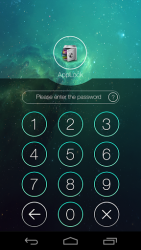
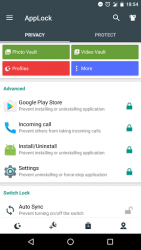
In depth
- AppLock can lock Facebook, Whatsapp, Gallery, Messenger, Snapchat, Instagram, SMS, Contacts, Gmail, Settings, incoming calls and any app you choose. Prevent unauthorized access and guard privacy. Ensure security.
- AppLock can hide pictures and videos. Hidden pictures and videos are vanished from Gallery and only visible in the photo and video vault. Protect private memories easily. No pin, no way.
- AppLock has random keyboard and invisible pattern lock. No more worry people may peep the pin or pattern. More safe! - With AppLock, you will:
Never worry about parents check your Snapchat, Musical.ly!
Never worry about friends borrow your phone to play games with mobile data again!
Never worry about a workmate gets your phone to look the gallery again!
Never worry about someone reads private data in your apps again!
Never worry about kids mess up Settings, send wrong messages, paying games again! FAQ-
1) How to change password?
Open AppLock, Protect, Unlock Settings 2) I hide AppLock icon, how to open AppLock now?
There are two ways to open it:
1. Enter #password in your dial pad, and tap call button.
2. Open domobile.com/applock in the browser. 3) How to stop other people uninstall AppLock?
Please enable Advanced Protection in Protect of AppLock, so nobody can uninstall or kill AppLock without password. You can disable Advanced Protection when you don't want it. 4) How to uninstall AppLock?
After you enable Advanced Protection, nobody can uninstall AppLock without password. If you want to uninstall it, please disable advanced Protection first. 5) I forgot my passwordHow to find it?
Update to the latest version first. And then tap AppLock icon, click the icon at the up right corner of lock page, tap the 'forgot password'.
1. By security answer: enter your security answer and click 'reset password'.
2. By security email: click 'send code to security email', input reset code and click 'reset password'. 6) I can not move in/out my photo in the vault.
Please check internal storage space, if only 10% free ,system will not let us to move file to vault. 7) Account Type
There are 3 types of account in AppLock. You can choose it in Account Center. It is in the left menu of AppLock.
1. Premium: paid, premium features , no ad.
2. AD: free , premium features , ad.
3. Basic: free, no ad , no premium features. -Features-
Lock apps with password lock, pattern lock, or fingerprint lock.
Photo vault, hide pictures
Video vault, hide videos
Well designed Themes
Customized background, select a favorite picture
Default profiles: Unlock all, Guest
Customized Profiles: set different locked app groups, change lock quickly
Time Lock: auto-lock/unlock according to time
Location Lock: auto-lock/unlock according to location
Hide AppLock icon
Advanced Protection: prevent AppLock being killed by task killer
Random keyboard: prevent people peeping pin code
FingerprintمForce stopped cover
Lock switch (WiFi, Bluetooth, mobile data, sync)
AppLock widget: enable/disable AppLock with one tap
Quick lock switch: Lock/unlock in notification bar
Lock incoming calls
Lock system settings to prevent a mess by kids
Lock Google Play to prevent buy games
Allow a brief exit: no need password, pattern, fingerprint again within set time
Prevent uninstalling apps
Low memory usage.
Power saving mode to save battery Feel free to send your feedback to us! support-domobile.com
Verdict
AppLock is an Android application available under the Freeware license — the APK is 4.16 MB. We’ve catalogued it under Security.
At a glance
Help fellow users decide. Share your experience with AppLock.