
Android · Free download · Health
Pedometer5.11
- Operating system
- Android
- File size
- 1.8M
- License
- Freeware
- Last updated
- May 5, 2026
39 downloads·780 page views
Android · Free download · Health
39 downloads·780 page views
Screenshots
In depth
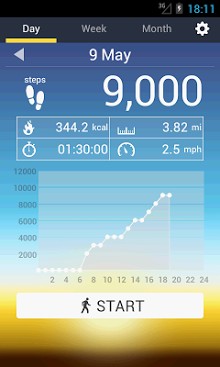
if you tend to walk a lot every day and you want to keep a step count, you can now do so with pedometer, a tool to track your daily movements in real time. Together with the number of steps you take, pedometer also calculates your walking speed, number of calories burned, distance walked, and how long you've been walking, giving you a good overview of how much exercise you've done during your walk. This tool registers your daily activities and manages them over weeks and months thus offering a more global view of your activity over long periods of time. All this is collected into nice graphs of your overall trends that you can see for any given day. In order to stop counting steps you simply have to press the stop button immediately stopping the pedometer from registering all values. The data are more reliable the more personal info you enter onto your profile, especially age, weight, and height.
A fantastic and extremely handy app that gives you the opportunity to record and count your steps easily and conveniently. Is there any tool like this that is recommended?. It is possible to use your smartphone as an easy-to-use pedometer. The mobile app works in a very simple way as all you have to do is put it in your pocket walk wherever you want and forget about it. The app does the rest!
the great thing about pedometer is that not only does it count your steps, but it also records measurements you may find interesting; distance covered, seconds you've been walking, and calories burned. Consequently you have a complete log of your steps and relevant useful information.
to sum up, pedometer is an excellent option as a pedometer, giving you the benefits of a handy, simple, and easy-to-use tool. You can try it and see what it can do for you.
Verdict
Pedometer is an Android application available under the Freeware license — the APK is 1.8M. We’ve catalogued it under Health.
At a glance
Help fellow users decide. Share your experience with Pedometer.