Total Commander icon

Android · Free download · Utilities

Total Commander2.72

Operating system
Android
File size
1.79 MB
License
Freeware
Last updated
May 5, 2026

102 downloads·881 page views

Screenshots
See Total Commander in action

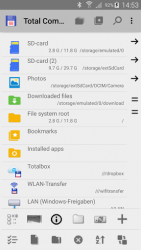
Total Commander screenshot 1
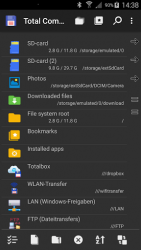
Total Commander screenshot 2

In depth

A closer look at Total Commander

Android version of the desktop file manager Total Commander (ghisler.com). Important note: This app does NOT contain any ads. However, it contains a link -Add plugins (download)- in the home folder. This is treated as an ad by the Play Store because it links to our other apps (plugins). Main features:- Copy, Move whole subdirs- Drag - Drop (long press on file icon, move icon)- Inplace rename, create directories- Delete (no recycle bin)- Zip and unzip, unrar- Properties dialog, change permissions- Built-in text editor- Search function (also for text)- Select/unselect groups of files- Select by tapping on file icons- Select range: Long tap+release on icon- List of installed Apps (built-in plugin)- FTP and SFTP client (plugin)- WebDAV (Web folders) (plugin)- LAN access (plugin)- Plugins for cloud services: Google Drive, Microsoft Live, Dropbox- Root support for the main functions (optional)- Send files via Bluetooth (OBEX)- Thumbnails for pictures- Two panels side by side, or virtual two panel mode- Bookmarks- Directory history- Media player which can stream directly from LAN, WebDAV and cloud plugins- Configurable button bar for changing directories, internal commands, launching apps, and sending shell commands- Simple help function in English, German, Russian, Ukrainian and Czech- Optimizations for visually impaired, like text for icons- Supported languages of the main program: English, German, Bulgarian, Croatian, Czech, Danish, Dutch, French, Greek, Hungarian, Indonesian, Italian, Japanese, orean, Polish, Portuguese, Romanian, Russian, Serbian, Simplified Chinese, Slovak, Slovenian, Spanish, Swedish, Traditional Chinese, Turkish, Ukrainian and Vietnamese.

Total Commander 3.50b1d

For windows the ptotal commander is the android version of the same file manager it offers a series of similar advantages to those of its version for desktop operating systems. The application allows you to copy and paste entire directories and subdirectories easily. Create new folders or change the name of existing folders and of course delete files or folders. You've got to be careful when you do this last action because you won't have a recycling bin. Ppmore options of this android version can be found when working with compressed files that you can open easily and even create new. Independently, if a file is in. Zip files or. Upon opening the rar you will not have any problems with the contents. Even more interesting than the previously mentioned tools is the possibility to put a widget on the desktop with access to an ftp client or have an internal text editor to work with without the need to resort to other applications. In spite of having an unattractive to ugly interface pptotal commander offers a number of very high benefits. Furthermore, as ugly as its interface is, it's also as practical.

Verdict

Should you install Total Commander?

Total Commander is an Android application available under the Freeware license — the APK is 1.79 MB. We’ve catalogued it under Utilities.

Verified clean. Every Total Commander APK on SoftLookup is scanned for malware, spyware, and adware. We re-test on every update.
Sponsored

At a glance

Total Commander specifications

Category
Utilities
Publisher
C. Ghisler
Last updated
May 5, 2026
License
Freeware
Operating system
Android
File size
1.79 MB
Price
Free
Page views
881
Sponsored

Leave a comment

Help fellow users decide. Share your experience with Total Commander.

Download Total Commander