
Android · Free download · Business
Spending Tracker1.6.1
- Operating system
- Android
- File size
- 21.07 MB
- License
- Freeware
- Last updated
- May 5, 2026
31 downloads·942 page views
Android · Free download · Business
31 downloads·942 page views
Screenshots
In depth
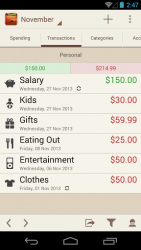
- Features - Simple and intuitive user interface
helps you track your spending quickly and easily
super fast expense entry Special design layout for tablets
optimal use of larger screen size makes it even better for managing your money Flexible Time Periods
choose to track Weekly, Monthly or Yearly Budget Mode
optionally set a fixed budget amount to help you meet your spending targets
carry over any remaining budget to the next month or week Summary View
overview of your current spending progress
time travel backwards and forwards in time
see your main areas of spending Log Expense and Income
easy and quick transaction entry
sort by date, name or amount
repeat transactions daily, weekly or monthly
export transactions to CSV for use in a spreadsheet
export transactions to PDF for viewing and printing (Pro Upgrade required) Multiple Accounts
create separate personal, business and savings accounts for example
switch between accounts, or view transactions for all accounts Reports
easy visualisation of where your money goes
beautiful and interactive charts
view spending grouped by category
see the history of your spending Categories
editable expense and income categories
choose a quality icon for each category Widget
put the widget on your home screen for easy access
show account summary
quick add buttons Local Tips
optionally receive tips when you enter participating local venues
this could include money saving offers
requires location and bluetooth permissions Backups
keep your data safe by backing up to Dropbox
the auto backups feature will take care of it for you Syncing (Pro Upgrade required)
automatically sync your data to other Android devices
you can also sync to iOS and Windows versions of Spending Tracker which will require a separate upgrade on these platforms - Permissions Explained -
-
Location and Bluetooth is required to provide the 'Local Tips' feature
Photos/Media/Files is required to write the CSV and PDF export files to the SD card
WiFi is required for various things including the Backups and Dropbox Sync features
Identity is required to access certain Google services such as allowing you to '+1' the app Some of these permissions can be configured after installation via the Settings app.
Verdict
Spending Tracker is an Android application available under the Freeware license — the APK is 21.07 MB. We’ve catalogued it under Business.
At a glance
Help fellow users decide. Share your experience with Spending Tracker.