
Android · Free download · Collection
Smart Touch Easy Touch - Assistive Touch3.0.3
- Operating system
- Android
- File size
- 3.88 MB
- License
- Freeware
- Last updated
- May 5, 2026
56 downloads·863 page views
Android · Free download · Collection
56 downloads·863 page views
Screenshots
In depth
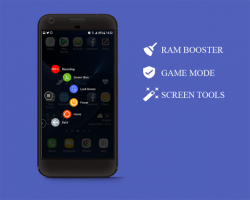
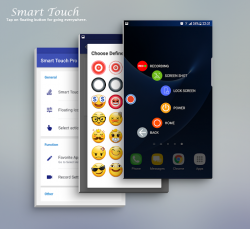
It supports some other useful features such as: Screen shot (Screen capture), Screen Recording, Ram booster (Ram Cleaner). You can also quickly access to all your favorite shortcuts, favorite applications, games, settings and quick toggle too. In another hand, Smart touch seems to be a type of Smart Intelligent Assistant. It is very useful for big screen smart phone. Assistive Touch for Android
Virtual Home key
Virtual Back key
Virtual Power key (Android 5.0 up)
Virtual Volume key, quick touch to change volume and change sound mode
Virtual Recent Panel key
Virtual Volume Up/Down key
Ram booster and clean memory. Speed up your device and save battery from your home screen. Quick Access (Quick launching)
Easy touch to open your favorite application
Direct opening application from circle menu
Direct opening shortcuts (Direct calls, Direct message, Direct contact)
Direct to control quick settings Advanced tools
Easy touch to screen recording, supporting attached image or fron camera (included audio form mic, media system) (Require Android 5.0 and above)
Easy touch to screen shot ((Require Android 5.0 and above)
SOS signal Quick settings
Rotation setting button
Open Notification
Location on/off settings
Wifi on/off settings
Airplane mode settings
Bluetooth on/off settings
Flashlight on/off settings
Data settings
Sound control
Ringer mode
Setting access key Customize
You can change icon of Smart Touch with many pretty icon, totally free with more than 40 items
You can change icon of Smart Touch with your image (from gallery or camera)
Customize size and alpha of floating ball
Drag and drop to change position of action
Able to customize the number of actions (the maximum is 10)
Able to add more actions from screen Language
Supported languages: English, German, French, Thailand, Spanish, Russian Sensitive Permission
This app uses Accessibility services
It is for physical disabilities, Smart Touch provides powerful single hand features, you can use one hand to operate the phone, switch apps easily, replacing the navigation hard keys, which can hardly be controlled by one hand. Please be assured that Smart Touch will not collect any of your private information, it is only for performing global action such as BAC, RECENT, POWER. BIND_DEVICE_ADMIN: This app uses the Device Administrator permission which is only used to lock screen (pressing sort key instead of physical power button) and turn off the screen of your device. CAMERA: To turn on Flashlight and shortcut to snap photos.
CALL_PHONE: Add contacts to Action so you can make calls. It is for Direct Call shortcut not from our application inside. Note
To prevent the app stopped by OS:
System Settings > Battery > Battery Optimization > Add apps >Smart Touch > Checked Don't optimize (From Marshmallow)
If your brand is XIAOMI, please execute the following below:
you must go to security ->choose permission -> permission -> SmartTouch and turn on pop up window. Follow up, you go to security -> Permisson -> AutoStart -> turn on SmartTouch.
Open app->uninstall menu if you can not uninstall the application. It is due to policy of google when you want to use Lock Screen feature because it requires Device Admin permission.
Screen shot (Screen capture), Screen Recording is only supported Android 5.0 up If your phone meets some above notes, please do not give bad review. It is not our bug, it is a limitation from Android technical. Please contact to our developer for helps.
Verdict
Smart Touch Easy Touch - Assistive Touch is an Android application available under the Freeware license — the APK is 3.88 MB. We’ve catalogued it under Collection.
At a glance
Help fellow users decide. Share your experience with Smart Touch Easy Touch - Assistive Touch.