
Android · Free download · Collection
AIO Launcher1.13.4
- Operating system
- Android
- File size
- 6.82 MB
- License
- Freeware
- Last updated
- May 5, 2026
62 downloads·894 page views
Android · Free download · Collection
62 downloads·894 page views
Screenshots
In depth
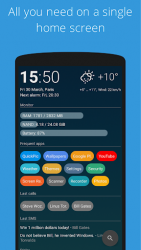
AIO Launcher can display the following information on the screen: - Weather current weather and forecast for 10 days;
- System monitor RAM and NAND usage, percentage of battery power;
- Notifications Standard android notifications (paid);
- Player when you turn on the music, playback control buttons appear;
- Frequent apps frequently used applications buttons;
- Frequent contacts the list of recent contacts;
- Your apps the icons of the selected applications (paid);
- SMS recently received SMS;
- Dialer numpad for quick calls;
- Timer timer start buttons;
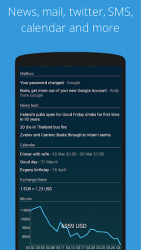
- Mail list of received emails;
- Telegram last messages (paid);
- RSS latest news;
- Twitter all tweets or a single user tweets;
- Calendar upcoming events in the calendar;
- Exchange rates currency exchange rates;
- Bitcoin the bitcoin price;
- Android widget standard app widgets (paid). Other features: - Several different themes;
- Icon packs support;
- Ability to change the font size;
- Advanced search system for applications, contacts, files and information on the Internet;
- Ability to rename applications. Usage:
- Swipe on search button opens quick menu with phone, camera and market;
- To add the Android widget, long press search button and select the "+" icon;
- To resize the widget, hold the finger on the widget, then use the up and down buttons;
- To access the list of all applications, drag from the left edge of the screen;
- To refresh the information on the screen, pull down;
- Hold finger on various elements of the screen to open menu;
- To open settings, hold your finger on the search button, and then click the gear icon;
- Hold the title of the widget to move it around;
- Any widget can be disabled in settings;
- You can minimize the widget by clicking on its name;
- To remove an application, open the application menu, hold your finger on the desired application, and drag it to the recycle bin icon. How to connect to Gmail: Go to the gmail settings, then "POP / IMAP Forwarding", then "Enable IMAP". How to connect to Outlook: support.microsoft.com/en-hk/help/12409/microsoft-account-app-passwords-two-step-verification How to set as default launcher on a Huawei smartphone: Settings Applications Settings Default applications Settings Manager AIO Launcher If notification widget don't work on MIUI: Settings Battery - performance Manage apps' battery usage Choose apps AIO Launcher No restrictions
Verdict
AIO Launcher is an Android application available under the Freeware license — the APK is 6.82 MB. We’ve catalogued it under Collection.
At a glance
Help fellow users decide. Share your experience with AIO Launcher.