In depth
A closer look at Metro UI Launcher 8
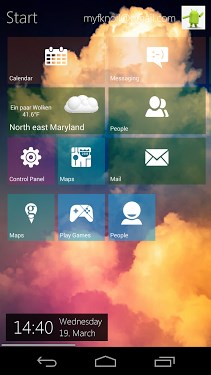
Metro Launcher now on your Android Device. Manage your homescreen in the unique Metro design. ( Inspired by Windows 8 Modern UI ) . Features: # Beautiful metro homescreen # Personalize your homescreen with your favourite Apps, Contacts and Widgets. # Rearange tiles with drag-n-drop. # Live weather tile for your current location # Sidebar in Charmbar -style # Fast access to your main functions: Internet, Store, Contacts, etc. # See your recent opened apps # Customize your background with (live) wallpaper # Change displayed account name and image # Optimized for tablets and smartphones # Quick-search via sidebar # Customize your launcher with lot of settings Open the appdrawer by click on Start. If you long press on an app, you can add it to your homescreen with Pin to Start. Other than in other launchers, this launcher is not imitating Windows Phone , but a similar design to the Windows 8 Surface Free-Version restrictions The Free version is limited. Widgets aren-t part of the free version. Personal customification can be made, but will be restored after 5 minutes. If you don-t want any limitation, please buy the Pro Version which is now available in the Store. Please keep in mind that this launcher is still in development Stay tuned for upcoming changes FAQ: #How can i start this App?- In fact it-s an Launcher, you can simply start it with the home-button and select this Launcher. If you already selected a other default launcher, you first have to clear the default config in your settings. # How can i open Settings of this App?- Open the charmbar and select settings. # And how can I open the Charmbar ?- Simple slide on the homescreen your finger from the right screen edge to the middle of the screen. Then the charmbar should be appear on the right side. # How i can reach all my apps.
- There are some methods: 1.) Click on Start on the left top corner of the home screen 2.) Open your Charmbar and select Search or Start #Where is the desktop?- We won-t provide any kind of Windows Desktop, because this is only launcher only provides the Metro surface # How can i uninstall this launcher?- Go to your settings, select this application and uninstall application If you enabled the device admin, you have to remove the app as device admin in your system settings. # I have a lot of suggestions and improvements- Please leave a comment in the community or contact us via mail # Can it handle multi windows?- NO, this functionality cannot be supported in our launcher # Can it run Windows 8 apps?- NO, this an ANDROID launcher (homescreen replacement) # Why you don-t make it like the original Windows 8?- We don-t wan-t to clone a Windows 8 for Android, but provide the Metro interface for your Android Homescreen. There won-t be any Desktop implementation. Also, not every functionality can be provided, because this is NOT Windows 8.1 .
Verdict
Should you install Metro UI Launcher 8?
Metro UI Launcher 8 is an Android application available under the
Freeware
license — the APK is 4.4M.
We’ve catalogued it under
Collection.
✓
Verified clean. Every Metro UI Launcher 8 APK on SoftLookup is scanned for malware, spyware, and adware. We re-test on every update.
Sponsored
At a glance
Metro UI Launcher 8 specifications
- Publisher
- Developer
- Last updated
- Feb 18, 2022
- License
- Freeware
- Operating system
- Android
- File size
- 4.4M
- Price
- Free
- Page views
- 902
Sponsored
Help fellow users decide. Share your experience with Metro UI Launcher 8.