In depth
A closer look at Plus Home Launcher
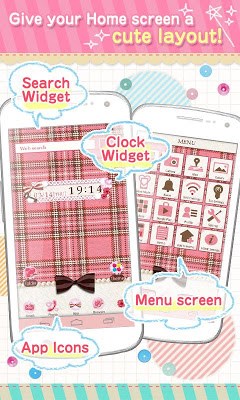
What You Can Change With [+]HOME you can choose designs for the following:- Wallpaper- Drawer (All apps) screen- Menu screen (Screen that appears when Menu is pressed. Contains frequently used apps.)- Main application icons (Mail, Browser, YouTube, Map, Calculator, Phone, Camera, etc.)- Clock widget, Search widget Theme Applications To setup a design, you will need [+]HOME plus a design Theme that can be downloaded separately. [+]HOME Theme apps can be found using one of the following methods:- Visit the webpage (goo.gl/7Lcf) and search for different Themes- After downloading the app, tap [+] Market on Home screen. How To Setup [1] Download [+]HOME > Install it. Device screen will change. [2] Using one of the methods above, find and download a Theme that you like. [3] In the bottom-right of the Home screen, select [Theme] > [My Theme]. Then choose the Theme to use to finish the setup. Provided By Ateam Inc. a-tm.co.jp- [+]HOME is a trademark of Ateam Inc.
- Android, Google Play are trademarks of Google Inc.
- Screenshots may differ depending on the device used.
Verdict
Should you install Plus Home Launcher?
Plus Home Launcher is an Android application available under the
Freeware
license.
We’ve catalogued it under
Collection.
✓
Verified clean. Every Plus Home Launcher APK on SoftLookup is scanned for malware, spyware, and adware. We re-test on every update.
Sponsored
At a glance
Plus Home Launcher specifications
- Publisher
- Developer
- Last updated
- Jan 22, 2026
- License
- Freeware
- Operating system
- Android
- Price
- Free
- Page views
- 778
Sponsored
Help fellow users decide. Share your experience with Plus Home Launcher.