
Android · Free download · Collection
Microsoft Launcher4.1.0.37575
- Operating system
- Android
- File size
- 17.73 MB
- License
- Freeware
- Last updated
- May 5, 2026
24 downloads·1005 page views
Android · Free download · Collection
24 downloads·1005 page views
Screenshots
In depth
EY FEATURES
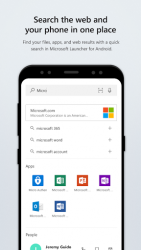
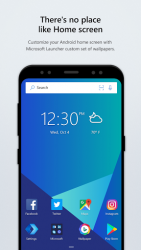
-People at your fingertips. Have your most important people at your fingertips. Pin contacts to your Home screen and place them anywhere on the Home screen, dock or in folders.-Choose your look. Personalize the look and feel of your device by customizing your wallpaper, theme and accent colors, icon packs, gestures and more.-Personalized feed. See your most important information at a glance like news, calendar events, docs, contacts and more in your personalized feed. You can even set your feed as your default Home.-Continue on PC. Snap a pic on your phone and see it instantly on your Windows PC- or continue editing an Office 365 document on your PC by linking your phone with your Windows PC.-Search the web and your phone in one place. Search the web or your files, apps, docs, messages and web results using Microsoft Launcher's universal search bar.-Gesture customization. With deep customization for gestures, you can double tap to lock your phone, swipe up for app drawer and more.
Th launcher app developed by microsoft with an elegant and practical interface. Although it doesn't come with any fancy new features it offers everything an android user would want in a tool like this one. Microsoft's arrow launcher is divided into three screens. On your default screen you'll also find a list of the apps you use most frequently and those you've recently used. You can also swipe up from the bottom of the screen to see a list of your apps with a search bar included. The screen on the left of the home screen contains the people you contact most. You can also send emails and messages from there or call these contacts.
on the screen on the right, you'll find the upcoming events in your agenda and the alarm. It's just a matter of sliding your finger to see if you have an alarm for birthdays or meetings. Arrow launcher is an excellent launcher for android with some really useful features and a beautiful interface. If fact, you can even choose in the options to update the wallpaper daily to bing's image of the day.
Verdict
Microsoft Launcher is an Android application available under the Freeware license — the APK is 17.73 MB. We’ve catalogued it under Collection.
At a glance
Help fellow users decide. Share your experience with Microsoft Launcher.