
Android · Free download · Collection
Computer Launcher3.3
- Operating system
- Android
- File size
- 6.05 MB
- License
- Freeware
- Last updated
- May 5, 2026
23 downloads·802 page views
Android · Free download · Collection
23 downloads·802 page views
Screenshots
In depth
Desktop Computer Design:
Customize your phone with unique look and feel of the fastest launcher. Amaze your loved one with computer look of your Android and also share it with your loved ones. Support of File Explorer and File Manager:
With built-in support of File Explore and File Manager you can search and explore your files and Folders, Copy, Paste, Zip/Unzip, RAR, Delete Files, Share Files and can do lot more
Explore your file system with this simple and efficient file explorer and file manager in native desktop computer design. Network Sharing of files and folders:
Share your files and folders with other users of computer launcher over Wifi network. Access your files everywhere over FTP/LAN. Features: Android application in Stylish Tiles In Start Menu
Best application are available on One Click Create Shortcuts of most used application on Desktop by press and Hold Feature.
Easy Navigation to the Apps
Built-In support of File Explorer Create Folders, Cut, Copy, Paste, Move, Share etc.
Listing of all of your drives, SD Card, Storage, audio and video files and pictures in PC style.
put the files to Recycle Bin and delete later
Built-in ZIP support allows you to decompress or extract ZIP/RAR files
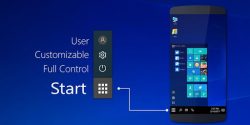
This android launcher completely transforms your smartphone interface and gives it the look of a computer with windows 10 operating system. The effect is pretty amazing! there’s a start button, your notification center, the clock on the lower right side of the screen, etc. You can quickly access all of the apps you have installed as well as all of the launcher configuration options and the button to turn off or restart the device using the start. What's great about the computer launcher is that it doesn't just affect the main screen it also changes the file manager which turns into an exact replica of the classic my computer section. You can easily access all the files on your android device with this section. And as you can imagine you can do any action you can with windows. Ppcomputer launcher is an excellent alternative to any traditional launcher because it offers you a completely different experience than what you're used. For those who want to feel like they're using windows on their smartphones it's ideal.
Verdict
Computer Launcher is an Android application available under the Freeware license — the APK is 6.05 MB. We’ve catalogued it under Collection.
At a glance
Help fellow users decide. Share your experience with Computer Launcher.