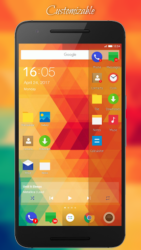
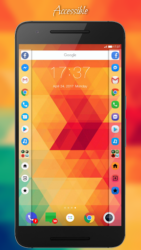
Side Apps Bar allows you to run any application whenever you want.It allows you to easily switch betweeninstalled apps. Don-t wait.Clean up your homescreen and save your time! Main Features-Fast and accessible app switcher-Two sidebars (left bar and right bar) with shortcuts-Provides real multitasking-Very customizable If you-ve been looking for a way to organize your apps better,you-re going to find Side Apps Bar Floating Sidebar super useful. Floating sidebar launcher on the edge of your screen will be perfect for youif you-d like to clean up your homescreen and make use of multitaskingwhich is supported by your phone. Floating sidebar launcher will surely make your life easier.It is a new way to use the power of your phone.If you-ve been looking for a convenient, modern and fast task switcher/app switcher this taskbar is definitely for you. If one floating sidebar on the edge of your phone isn-t enough for you, turn onsecond floating sidebar. With two bars you will fully use thepower of this application. Switching between opened tasks will be very simple. Thanks to sidebars you will see what is real multitasking. With sidebarson the edges you don-t have to use default system switching between recent running tasks any longer. If you-re tired using app drawer simply use edge side bar.If you have a lot of apps simply use edge side bar toorganize all of them. If you want to have quick access to your favourites appssimply use edge side bar.If yes, Side Apps Bar- Edge Sidebar is what you really need. Side Apps Bar- Edge Sidebar is powerful floating task switcher.How to use it? - First add shortcuts to the bar. - Then swipe task bar from the edge of the screen. - After that simply click a shortcut icon to quickly switchbetween current task and another task.That-s all you have to know. Floating sidebar launcher stay always on top of all other apps.Of course, you can open and hide it whenever you want.You can add to the taskbar as many shortcuts of your installed appsas you want. There-s no limit. Floating sidebar launcher is fully customizable.For example, you can set:-Icon -> size, transparency, color-Background -> corners, transparency, color-Shadow -> width, color-Signatures (below icons) -> font type(sans, serif, monospace), font style, font size, font transparency-Columns -> from one to four columns with shortcuts-Bar -> height, location(top,center,bottom)-And much more- Choose shortcuts from three categories.Apps-Add any installed application to the edge barTools-Network Settings-Wifi Settings-Bluetooth Settings-Gps Settings-Sound Settings-Display Settings-eyboard Settings-And more-Actions-Home Button-Back Button-Recent Tasks Button-Quick Settings Button (Status Bar)-Notifications Button (Status Bar) Make use of multitasking with cool floating task switcher!Swipe Side Apps Bar- Edge Sidebar and use its possibilities!
Verdict
Should you install Side Apps Bar - Edge Sidebar?
Side Apps Bar - Edge Sidebar is an Android application available under the
Freeware
license — the APK is 10.15 MB.
We’ve catalogued it under
Collection.
✓
Verified clean. Every Side Apps Bar - Edge Sidebar APK on SoftLookup is scanned for malware, spyware, and adware. We re-test on every update.