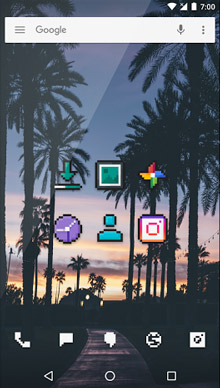
In depth
A closer look at PixBit - Icon Pack
Features:
860+ icons included.
Support for 12 launchers
(Action Launcher, Nova Launcher, Apex Launcher, Atom Launcher, Aviate Launcher, Go Launcher, Launcher, Next Launcher, Solo Launcher, Smart Launcher, LG Home, ADW Launcher.)
CyanogenMod Theme engine supported
Polar Material Design dashboard
Muzei Support
Widgets in screenshots are Wafer for Zooper Pro. Useful Information: Theme Engine:
If you have used the CyanogenMod Theme Engine to apply the icon pack, you will not be able to select alternative icons as this is a feature which needs to be added to CM Themes itself. You will have to install a launcher which allows you to edit icons. Resolution?
All icons are made in the highest definition available for Android devices (so far). So they should look clean and sharp. Alternative icons:
If you wish to use an alternative icon for a specific app, you can do so by holding down the specific icon, this will bring up a small popup allowing you to edit the icon and the name. From there, select the icon, this will show another popup then select PixBit and choose your preferred icon. Bad icons?
If you find some icons which arent appealing, please join the beta community and let me know instead if giving a bad rating. Links can be found in the description. Google Now Launcher?!
Google Now Launcher is a stock launcher and does not support icon packs.
Verdict
Should you install PixBit - Icon Pack?
PixBit - Icon Pack is an Android application available under the
Freeware
license — the APK is 5.6M.
We’ve catalogued it under
Collection.
✓
Verified clean. Every PixBit - Icon Pack APK on SoftLookup is scanned for malware, spyware, and adware. We re-test on every update.
Sponsored
At a glance
PixBit - Icon Pack specifications
- Publisher
- Developer
- Last updated
- Feb 2, 2026
- License
- Freeware
- Operating system
- Android
- File size
- 5.6M
- Price
- Free
- Page views
- 1016
Sponsored
Help fellow users decide. Share your experience with PixBit - Icon Pack.