In depth
A closer look at easyFocus
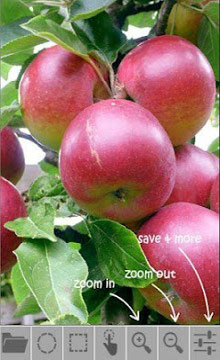
Produce SLR camera like focus and defocus effect with your photos. Just open your pictures in easyFocus, play with the tools, create stunning focusing effects and save the creation. Its easy and simple. Features- 1. Tools: Standard photo editing tool features, like- image zoom in, zoom out, tap and dragging, pinch and zoom, image rotation, undo, reset, save are there. 2. Circular Focus: Place a circular lens like focus effect in your photo. Drag it and place it, where you need it. Control the area size of the focus by focus size control buttons or BY SIMPLY PINCH GESTURE. 3. Rectangular Focus: Place a Rectangular focus area effect in your photo. Drag it and place it, where you need it. Control the area size of the focus by focus size control buttons or BY PINCH GESTURE. 4. Selective Focus: Customize your focus area, select the area to focus. Try the Selective Focus tool. Tap and drag your finger over screen and select your desired focus area. Control the brush size by brush size control buttons. Make your selection perfect with the eraser tool. Erase the unwanted selection area. 5. Focus Flip: Altering the focus area to unfocused area (and vice-verse) is just a matter of tap. Flip tool makes the focus reversing in blink of an eye. 6. Photo Enhancement: Use the Photo Enhancer tool to make dull images look vibrant. Use it and see the difference. 7. Miniature Photography: By combining the Rectangular Focus and Photo Enhancer, one can create miniature photography like effects. So, go happy focusing- easyFocus-ing.
Verdict
Should you install easyFocus?
easyFocus is an Android application available under the
Freeware
license — the APK is 266k.
We’ve catalogued it under
Photography.
✓
Verified clean. Every easyFocus APK on SoftLookup is scanned for malware, spyware, and adware. We re-test on every update.
Sponsored
At a glance
easyFocus specifications
- Publisher
- Developer
- Last updated
- Feb 8, 2026
- License
- Freeware
- Operating system
- Android
- File size
- 266k
- Price
- Free
- Page views
- 648
Sponsored
Help fellow users decide. Share your experience with easyFocus.