In depth
A closer look at Volume Booster Plus
What sets Volume Booster Plus from other similar applications is that when a user activates boost this app not only amplifies the sound to the end, but also uses the built-in Sound Android equalizer to optimize the frequency channels by means of a special algorithm. So the result is a stronger and clearer sound and Audio.
Why you will have to download and install Volume Booster Plus on your android Smartphone or tablet instead of other Speaker booster or Sound Booster apps?
Now you can use Volume Booster Plus and make:
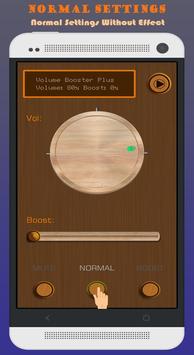
1- Control boost level!
2- Enable or disable Speaker Boost from active notification.
3- Control Volume Booster from your android ware device.
4- Start your favorite music player directly from Volume Booster Plus.
5- Mute mode: Disable sound boosting
6- Normal mode: for normal phone use no need for boosting.
7- Boost mode: to make music more louder and add more bass on it.
The volumes that you can boost are:
- Media player volume.
- Mp3 music volume.
- Sound music volume.
- Audio music volume.
This is not for adjusting the speakerphone volume in phone calls (that has its own boost, I think), but for adjusting the volume of music, video, movies and apps.
Requirements
Device requirements
Android 4.0+
Verdict
Should you install Volume Booster Plus?
Volume Booster Plus is an Android application available under the
Freeware
license — the APK is 4.3 MB.
We’ve catalogued it under
Multimedia.
✓
Verified clean. Every Volume Booster Plus APK on SoftLookup is scanned for malware, spyware, and adware. We re-test on every update.
Sponsored
At a glance
Volume Booster Plus specifications
- Publisher
- SimoyAppy Media
- Last updated
- Jan 23, 2026
- Requirements
- Android 4.0+
- License
- Freeware
- Operating system
- Android
- File size
- 4.3 MB
- Price
- Free
- Page views
- 1104
Sponsored
Help fellow users decide. Share your experience with Volume Booster Plus.