In depth
A closer look at Compass Coordinate
NOTE: - The app can-t work if your device don-t have compass sensor such as SamSung Galaxy J7, Samsung J2 2018 etc.
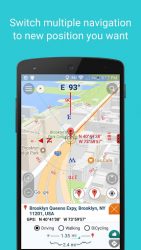
- The app won-t save or send any user information to any where. Compass application is a navigational instrument that shows directions in a frame of reference that is stationary relative to the surface of the Earth. And will help you retrieve the coordinates and/or address of a specific location on the map. The frame of reference defines the four cardinal directions (or points) north, south, east, and west. Intermediate directions are also defined. Compass App have function as Compass with Google Map or Compass GPS Route Finder. - Location address name in application is provided by Google Service, it-s just relatively. But GPS latitude-longitude is detected by your device and it is exactly. - You can quick get direction by tap on screen via 3 types: Driving, Walking - BiCycling- You can use it in operations at sea, in the forest, desert, direction of flight of the aircraft - - You can quick to search address or find out exactly location by enter Coordinates or enter Latitude - longitude.
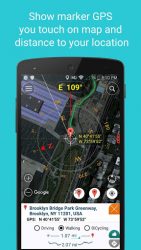
- You can quick to switch 4 types of maps:- normal- satellite- terrain- hybrid -Compass Pro- can use the Internet and GPS to find your location and address you standing. You can connect directly via Google Map by push on button -direction- on the top right screen when you activate this feature.
- A tool to find the directions when you fear to lost your directions via direction Google Map- Support Zoom out by push on Marker or- Show your position on Google Map background with latitude- longitude- Shows degrees in-side window- Display latitude, longitude and altitude- GPS Location update- Select the best network connection automatically (Wifi, 3G, GPS)- True north/Magnetic north- 2 compass design/styles and 3 themes to select- Quick Calibration- Customizable coordinate format, sensor rate, text size, text color, unit- Menu shortcut button on main screen- eep screen awake- Rotating bezel- Support Map Coordinates- Find easiest and fastest route for your destination.
- Easily track all the locations you have visited.
- Find Address of any area in map by search option or touch on map.
- Easily delete your complete location history just by one click.
- Best GPS Route Finder app for android.
- GPS Route Finder is completely. In addition, the application can change different themes to you have more choices color fit individuals. (This app use some icons in icons8.com, freepik.com/, clipartbro.com/)&-
Verdict
Should you install Compass Coordinate?
Compass Coordinate is an Android application available under the
Freeware
license — the APK is 8.92 MB.
We’ve catalogued it under
Productivity.
✓
Verified clean. Every Compass Coordinate APK on SoftLookup is scanned for malware, spyware, and adware. We re-test on every update.
Sponsored
At a glance
Compass Coordinate specifications
- Publisher
- Have a nice day
- Last updated
- May 5, 2026
- License
- Freeware
- Operating system
- Android
- File size
- 8.92 MB
- Price
- Free
- Page views
- 905
Sponsored
Help fellow users decide. Share your experience with Compass Coordinate.