Tune Me icon

Android · Free download · Multimedia

Tune Me2.2.19

Operating system
Android
File size
8.7 MB
License
Freeware
Last updated
May 5, 2026

19 downloads·1764 page views

Screenshots
See Tune Me in action

Tune Me screenshot 1
Tune Me screenshot 2
Tune Me screenshot 3

In depth

A closer look at Tune Me

Record tracks with Pitch Shift and Auto-Pitch effects over 500+ free beats. Tune Me is the ultimate hip-hop and R&B recording studio.

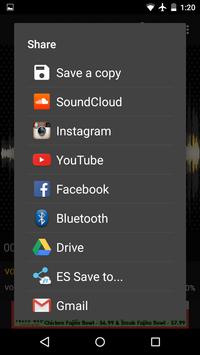
Set the Auto-Pitch effect to full strength to T-Painify your voice, or lower it for subtle, professional correction. Download and record over 500+ free beats, or install your own. Create high-quality tracks with full-featured recording and editing tools. Share your tracks to Soundcloud, YouTube, Instagram, and Facebook.
Recording and Editing Features
-Fast processing - effects applied in background while recording
-Calibration - automatically syncs vocals with the beat
-Mixer - adjust volume of vocals and beat separately
-Waveform Display - visualization of audio helps you stay on track while recording
-Clip Light - lights up if you are singing too loudly
Pro Upgrade
Take your recording to the next level with these awesome extra features:

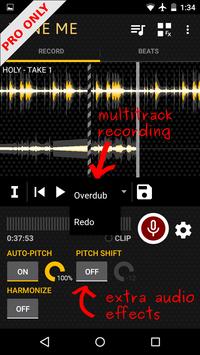
-Multitrack Recording
- Record multiple lines in your track or recover over your mistakes
- Swipe to seek the waveform and start recording at any point in the track
-Extra Audio Effects
- Pitch shifter - drop your voice an octave lower or shift if higher
- Harmonize - creates a chorus-like effect of duplicated vocal tracks
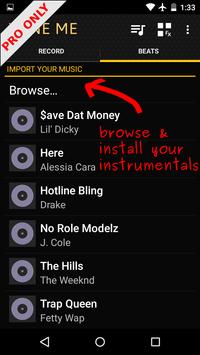
-Browse Beats
- Select any audio file on your device as a beat via the Browse menu
-The Pro version is ad-free

Tune Me 2.2.19

This is a sound recording app that lets you do much more than simply record audio. Tones you can use tons of tone correction tools to make your voice sound exactly the way you want it to sound.

in addition to recording sound, you can use tune me to add different beats to your recordings. Most of them, from very famous authors, are paid; but there are also a lot of free one available as well. Choose the beat you want set the volume and start recording.

once you finish recording, it's time to 'fix' the audio. The process is very simple: choose the intensity (between one and 100) and a key. The new creation is ready within a couple of seconds after confirmation of these selections.

tune me is a powerful audio recording app. And the app has an elegant and simple interface that you can customize however you want using different colors.

Requirements

Device requirements

Android 4.0+

Verdict

Should you install Tune Me?

Tune Me is an Android application available under the Freeware license — the APK is 8.7 MB. We’ve catalogued it under Multimedia.

Verified clean. Every Tune Me APK on SoftLookup is scanned for malware, spyware, and adware. We re-test on every update.
Sponsored

At a glance

Tune Me specifications

Category
Multimedia
Publisher
B-Side Studios
Last updated
May 5, 2026
Requirements
Android 4.0+
License
Freeware
Operating system
Android
File size
8.7 MB
Price
Free
Page views
1764
Sponsored

Leave a comment

Help fellow users decide. Share your experience with Tune Me.

Download Tune Me