In depth
A closer look at RecForge II - Audio Recorder
RecForge II is an Android dictaphone and editor to record, convert, play, edit, and share your recordings in most popular audio codecs
Main features :
- Highly customizable recorder (codec, samplerate, bitrate, mono / stereo)
- Use external microphone (RODE, iRig, ...)
- Disable AGC (Automatic Gain Control)
- Manual gain adjustment
- Skip silences
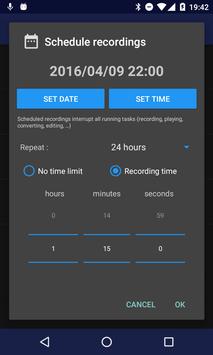
- Schedule recording
- extract sound stream from videos
- Music speed changer : Adjust tempo, pitch, playing rate
- Loop on playing selection
Recording :
- Recorder for sound, voice, note, dictation, rehearsal, meeting, lecture, music learning, EVP, studio recording, ... in mp3, m4a, ogg, wma, opus, flac, speex and wav codec
- Real-time monitoring (live audio spectrum analyzer)
- Use front, rear or external microphone (TRRS adapter, RODE SC6, iRig Mic, iRig Cast, iRig Pre or RODE smartLav)
- Skip silences
- Disable AGC (Automatic Gain Control) for better quality
- Schedule a date to start the recorder
- Record in background
- Control the recorder from the notification bar
Playing :
- Loop for memorization, actor lines, bible memory, recitations, ...
- Visualize stereo audio signal (audio spectrum analyzer)
- Music speed changer : Time stretching with playing rate, pitch and tempo adjustment (to practice an instrument or transcribe lecture, ...)
Editing :
- Convert your dictation to mp3, m4a, ogg, wma, opus, flac, speex and wav with all possible settings : samplerate, bitrate, mono / stereo, ...
- Extract sound stream from video
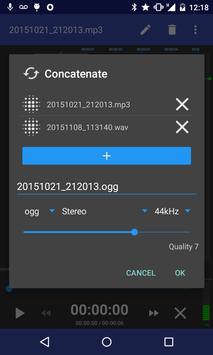
- Edit your recordings (cut or crop to keep only interesting parts concatenate or merge to make basic arrangements) for ringtones, commentary, ...
- Tag your recording and edit metadata
- Change music speed (tempo, pitch and rate) and save as a new file
Others :
- Play, record, pause / resume, loop, convert, edit, concatenate, merge, time strecth, adjust pitch, tempo and playing rate
- Send your dictation to cloud storage services or share your recordings with your friends by mail, SoundCloud, WhatsApp …
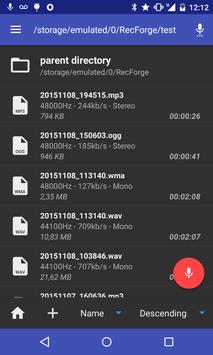
- Manage and organize your files with folders (rename, delete, copy, move)
- Sort recordings by date, name and size
- Save sounds to android media library
- 4 widgets (one click recorder)
- Material design UI
Supported audio formats :
- samplerate from 8 to 48kHz
- encoding codec : mp3, m4a, ogg, wma, opus, flac, speex and wav
- decoding codec : mp3, ogg, wav, wma, flac, opus, speex, m4a, m2a, mp2, aac, m4v, mp4, mka, mkv, ac3, eac3, amr, 3gp, 3g2, avi, mov, asf, ogv, .wmv, .flv, .f4v, .webm
- bitrate from 32 to 320 kbps
- mono / mono x2 / stereo (cf FAQ)
Requirements
Device requirements
Android 4.4+
Verdict
Should you install RecForge II - Audio Recorder?
RecForge II - Audio Recorder is an Android application available under the
Freeware
license — the APK is 8.2 MB.
We’ve catalogued it under
Multimedia.
✓
Verified clean. Every RecForge II - Audio Recorder APK on SoftLookup is scanned for malware, spyware, and adware. We re-test on every update.
Sponsored
At a glance
RecForge II - Audio Recorder specifications
- Publisher
- Dje073
- Last updated
- May 5, 2026
- Requirements
- Android 4.4+
- License
- Freeware
- Operating system
- Android
- File size
- 8.2 MB
- Price
- Free
- Page views
- 1371
Sponsored
Help fellow users decide. Share your experience with RecForge II - Audio Recorder.