
Samsung Email icon

Android · Free download · Productivity

Samsung Email4.2.74.1

Operating system
Android
File size
23.8 MB
License
Freeware
Last updated
May 5, 2026

11 downloads·1309 page views

Screenshots
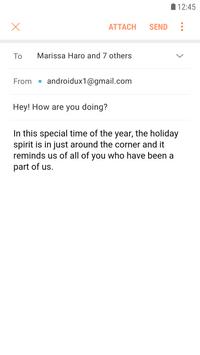
See Samsung Email in action

Samsung Email screenshot 1

In depth

A closer look at Samsung Email

This update is available for Samsung Mobile with Android OS.

Samsung Email enables users to manage multiple personal and business email accounts seamlessly. Samsung Email also offers EAS integration for business, encryption using S/MIME to safeguard data and ease-of-use features such as insightful notifications, SPAM management. Furthermore, organizations can administer various policies as needed. 
 
ey features
آ· POP3 and IMAP support for managing personal email accounts
Exchange ActiveSync (EAS) integration for synchronizing Exchange Server based business email, calendars, contacts and tasks
آ· Encryption using S/MIME for secure email communication

Additional features
آ· Customizable user experience with notifications, schedule synchronization, SPAM management, and combined mailboxes
آ· Policy administration with comprehensive, built-in EAS support
آ· Conversation and thread view to read related mail
- Regarding the App Access Permission -

The following permissions are required for the app service. For optional permissions, the default functionality of the service is turned on, but not allowed.

[Required permissions]
- None

[Optional permissions]
- Camera: Used to attach photos to email
- Location: Used to attach current location information to email
- Contacts: Used to link email recipients/senders with contacts and synchronize contact information when using Microsoft Exchange account
- SMS: Used to provide SMS synchronization function when using Microsoft Exchange account
- Storage: Used to attach files to email or save attached files
- Phone: Used to check device-unique identification information when using Microsoft Exchange account.

Samsung Email 6.1.82.0

Samsung e-mail is the official email application for samsung smartphones and tablets. Using it you can add e-mail accounts from various sources including gmail outlook yahoo exchange office365 and basically any other provider whose network data you have.

thanks to samsung email, you can consult all your emails in the same inbox. As a bonus all notifications are made via push so you'll be notified on the device when new emails arrive. By using your samsung email you can also send e-mail messages with any of the identities associated with. In addition you can save a draft of an email you left unfinished or want to send later. Ppthe samsung email app only supports samsung devices running android 7. 0 or later. Therefore, if you do not have a device from the company and do not meet the android requirements, it is better not to install it, as you will start getting errors with the warning that the application is constantly closing. This is because samsung device apps use the framework of the company to run. Without coding applications cannot function normally and therefore lack code. Is downloading samsung email apk the best option available for managing multiple email accounts on a samsung device?.

Requirements

Device requirements

Android 7.0+

Verdict

Should you install Samsung Email?

Samsung Email is an Android application available under the Freeware license — the APK is 23.8 MB. We’ve catalogued it under Productivity.

Verified clean. Every Samsung Email APK on SoftLookup is scanned for malware, spyware, and adware. We re-test on every update.
Sponsored

At a glance

Samsung Email specifications

Category
Productivity
Publisher
Samsung Electronics Co., Ltd.
Last updated
May 5, 2026
Requirements
Android 7.0+
License
Freeware
Operating system
Android
File size
23.8 MB
Price
Free
Page views
1309
Sponsored

Leave a comment

Help fellow users decide. Share your experience with Samsung Email.

Download Samsung Email