In depth
A closer look at Screenshot - Screen Grabber
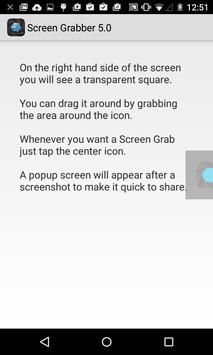
The fastest and easiest way to take and share screenshot is now here! Download Screenshot - Screen Grabber, a FREE screen tool to capture screen and share screenshot instantly. Just open the app and an icon will appear on your phones screen. Tap on the icon anytime you want to grab a screenshot. Then you can immediately share or save screen shot through other apps, whether theyre messaging apps, emails, clouds, photo editing, or other phone tools!
Tired of trying to capture screenshot with one hand, or even two? With bigger phones capture screenshot by pressing two buttons at the same time is hard, and so are other gestures that mess up the screen. What if we tell you can help you to capture it in less than a second with only one tap of your finger with our handy tool? JaredCo has created an awesome handy tool just for you! Its a totally flexible screen capture app that lets you share screen shots with anyone using phone tools already installed on your phone. Simple. Easy. Useful. and FREE!
BENEFITS OF USING SCREEN GRABBER:
- ONE TAP screen capture. Just tap on the icon and our app will instantly capture screenshot.
- Seeing something nice or funny on Instagram or chat sessions? Capture it with Screen Grabber!
- No one will know you ve taken the snapshot. One tap to your phone screen and youre done. There is no screen tool more simple & handy than Screen Grabber.
- 100% FREE with NO IN APP PURCHASE!
- Share the screen record through other apps: Emails, Facebook, Photo Editing apps, Cloud Service, or any phone tools you have.
- Move around the capture screen icon to anywhere on the screen for more comfortable viewing.
- Screen Grabber save screen shots and all the screen captures in a new picture file called Screen Grabs.
Want to see you contacts list from a month ago? Easy if you grab screen shot of that important clients phone number. The snapshot of your screen is saved in the file labeled Screen Grabs, right where we put it for you. Want to send a map or directions to your technically-impaired friends? It doesnt get any easier than click and send the screenshot or screen record.
Pictures, app icons, maps, tools, contacts, addresses no matter whats showing up on your screen, you can capture it with Screen Grabber and save screen shots in one place so you dont have to fumble for what you need now. These screen records are very handy to have!
Best of all, this handy tool, Screen Grabber, is totally FREE! It costs you zip, nada, nothing, to capture screen anytime you want. But like all JaredCo apps, our screen tool delivers real functionality that enhances your Android experience in every way!
Requirements
Device requirements
Android 5.0+
Verdict
Should you install Screenshot - Screen Grabber?
Screenshot - Screen Grabber is an Android application available under the
Freeware
license — the APK is 3.2 MB.
We’ve catalogued it under
Productivity.
✓
Verified clean. Every Screenshot - Screen Grabber APK on SoftLookup is scanned for malware, spyware, and adware. We re-test on every update.
Sponsored
At a glance
Screenshot - Screen Grabber specifications
- Publisher
- JaredCo
- Last updated
- May 5, 2026
- Requirements
- Android 5.0+
- License
- Freeware
- Operating system
- Android
- File size
- 3.2 MB
- Price
- Free
- Page views
- 1360
Sponsored
Help fellow users decide. Share your experience with Screenshot - Screen Grabber.