In depth
A closer look at MAX AppLock - Fingerprint Lock, Security Center
MAX AppLock - Your privacy protection. Guard privacy 24/7! Lock your apps with app password lock, pattern lock, photo vault. Supports applock must-haves: App Locks, Intruder Selfie & Lock Disguise.
MAX AppLocker - the app lock - gives privacy protection for your android. Various locks are provided, such as WhatsApp lock and notification lock, which makes app lock a must-have privacy guard. Download MAX app locker, enjoy app lock free!App Locks - Both app locker, password lock, pattern and fingerprint lock supported
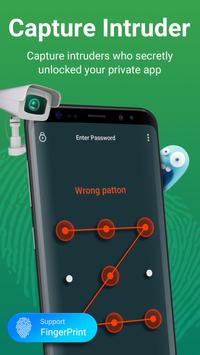
Intruder Selfie - Prevent intruders who try to unlock your app screen
Photo Vault Free - Photo vault with app lock to hide pictures and videos
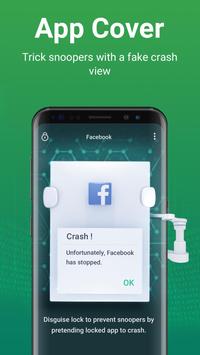
Lock Cover - Fake the unlock screen into an error report
Privacy Protection - Protect your privacy from intruders with app lock fingerprint and pattern password
Notification Organizer - App lock hides unwanted notifications. Never miss any important messages
App Manager - Uninstall useless apps & remove apk files
App Lock widget - One tap to enable/disable app locks
Parental Control - Applock important apps to avoid child messing it up
Cleaner & speed boost - Clean junk files, apk files and boost phone speed
Battery Saver - Save battery power for Android
Core Features: App lock, Intruder Selfie, Lock Disguise, Data Thieves
” App Locks - App lock for all apps, both app password lock & pattern lock available! Lock up sensitive apps such as WhatsApp, Instagram, Facebook, SMS, Contacts, Messenger, Settings, Gallery, Gmail, Browser, Play Store with password lock. Prevent unauthorized access and guard privacy with lock pattern and applock.
· Intruder Selfie - Max app lock watches out for you 24/7. With camera permission, App locker Secretly take a picture of those who try to unlock your apps with wrong passwords in three times. Find out who are the curious ones! Max app locker will send the photo of the intruder to your messages instantly for privacy security.
Photo Vault - MAX AppLock can transfer pictures and videos from Gallery to a photo and video vault with read/write external storage permission. You dont have to worry about others seeing your private photos and videos with app lock.
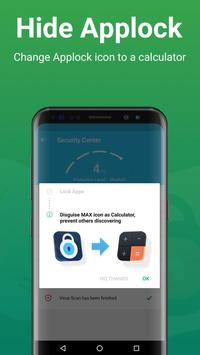
Lock Disguise - With MAX Applock, no more questions like "Why it's locked?". Set up a fake screen to avoid unnecessary troubles. Others will see only a "Something went wrong, instead of the actual app. You can even lock your apps with fake error window.
-Call Blocker & Assistant
Customize the numbers on your blacklist and block spam calls & unwanted calls. With Call, Contact and Read Phone State permissions, MAX AppLock can block all annoying spam calls and provide powerful call assistance.
Better User Experience
For better user experience, location & coarse location permission will be used to recommend the most suitable and localized content for you. We will never upload any of your location information.
MAX App Locker need get accounts permission to keep functions work better. We will never upload any of your accounts information.
-FAQ-
Want to change password?
AppLocker - Settings - Re-lock settings
Forgot password? Dont worry.
AppLocker - Upper right corner - Forgot password
More about fingerprint lock
-Fingerprint lock password is supported on specific devices that have the fingerprint sensor. For other devices, we support the PIN or Pattern password protection app lock fingerprint.
-Fingerprint lock can support most of SAMSUNG 6.0+, LG, SONY, MOTO, HUAWEI, Xiaomi, VIVO, OPPO and so on.
MAX App Lock free is your pro privacy guard, intruder protection, lock cover, app lock for all apps, and antivirus free! Want to protect your privacy? Lets lock it!
Requirements
Device requirements
Android 4.1+
Verdict
Should you install MAX AppLock - Fingerprint Lock, Security Center?
MAX AppLock - Fingerprint Lock, Security Center is an Android application available under the
Freeware
license — the APK is 11.1 MB.
We’ve catalogued it under
Utilities.
✓
Verified clean. Every MAX AppLock - Fingerprint Lock, Security Center APK on SoftLookup is scanned for malware, spyware, and adware. We re-test on every update.
Sponsored
At a glance
MAX AppLock - Fingerprint Lock, Security Center specifications
- Publisher
- ONE App Ltd.
- Last updated
- Feb 9, 2026
- Requirements
- Android 4.1+
- License
- Freeware
- Operating system
- Android
- File size
- 11.1 MB
- Price
- Free
- Page views
- 1396
Sponsored
Help fellow users decide. Share your experience with MAX AppLock - Fingerprint Lock, Security Center.