In depth
A closer look at Root Browser Classic
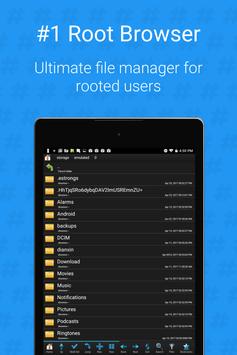
Root Browser Classic is the ultimate file manager for rooted users!
Explore all of Android's file systems and take control of your Android device. From copying and pasting files, to moving and renaming them, you will have full root access to your device.
Root Browser Classic features include:
-File Management
- Two file manager panels
- Zip, tar, delete, and move any file or folder
- Add new files & folders in any directory
- Change file permissions and ownership
- Create and delete directories
- Extract single files from zip/apks/jars
-Batch Copy & Paste
- Move multiple files at the same time
-Browse Files
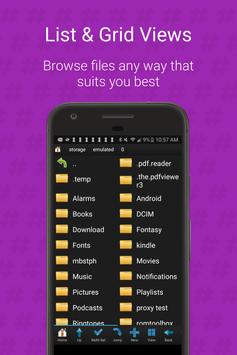
- View and edit files in list, grid, or thumbnail format
- Explore apk, rar, zip & jar files
- Sort by name, size, or date
-Bookmark Favorites
- Save your frequently used files and folders for quick access
-File Search
- Integrated search function
- Never lose a file!
-Other Awesome Features
- SQLite explorer
- Send files by email
- Install zips using clockwork recovery
- Execute script files
- Change the theme by double tapping home button
- Open files and folders of other apps
Requirements
Device requirements
Android 4.1+
Verdict
Should you install Root Browser Classic?
Root Browser Classic is an Android application available under the
Freeware
license — the APK is 4.0 MB.
We’ve catalogued it under
Utilities.
✓
Verified clean. Every Root Browser Classic APK on SoftLookup is scanned for malware, spyware, and adware. We re-test on every update.
Sponsored
At a glance
Root Browser Classic specifications
- Publisher
- JRummy Apps
- Last updated
- Jan 23, 2026
- Requirements
- Android 4.1+
- License
- Freeware
- Operating system
- Android
- File size
- 4.0 MB
- Price
- Free
- Page views
- 1488
Sponsored
Help fellow users decide. Share your experience with Root Browser Classic.