In depth
A closer look at Super Backup and Restore
The fastest data backup and restore tool on Android phones!
You can backup applications, contacts, text messages, call history, bookmarks, calendars to your SD card, Gmail, or Google Drive
You can share installation AP file to your friends by one tap.
You will never lose your data again!
-Important Notice #1
If you intend to do a factory reset on the phone, please make sure default backup folder is in your external SD card before doing it. If not, please copy the entire backup folder ("SmsContactsBackup" by default) to your external SD card
-Important Notice #2
Since Android M, access bookmarks from 3rd party application is disabled, so Super Backup cannot backup and restore bookmarks.
-Important Notice #3
If you schedule automatic backups, and you use some apps such as Task iller or Memory Clear, please make sure you had add Super Backup into their White List or Ignore list. Otherwise Super Backup can not run in background, and automatic backups will not work.
-Important Notice #4
When you finished the SMS restore process, but the messages were not displayed in your default SMS app, please try to reboot your device.
Features:
- Backup apps to SD card
- Backup Google Play download link for installed apps
- Backup & restore app's data(need root)
- Batch restore apps from SD card (need root)
- One tap to share AP files
- Backup Contacts & SMS & Call logs & Bookmarks & Calendars to SD card
- Restore Contacts & SMS & Call logs & Bookmarks & Calendars from SD card
- Can select SMS conversations to backup
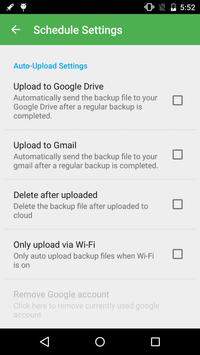
- Schedule automatic backups
- Auto-upload scheduled backup files to your Google Drive or Gmail
- Can download backup files from Google Drive
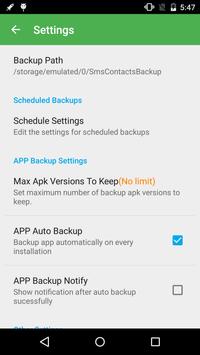
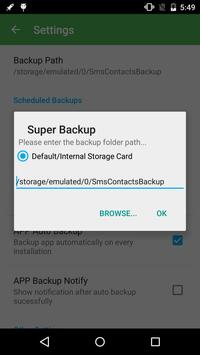
- User can change backup folder path in Settings
- Can backup Contact's group and picture properties
- Call Recorder: Support backup your voice call recording. It can perfectly record the phone call voices to mp3 files. Record both sides voice clearly!
Requirements
Device requirements
Android 4.0+
Verdict
Should you install Super Backup and Restore?
Super Backup and Restore is an Android application available under the
Freeware
license — the APK is 7.6 MB.
We’ve catalogued it under
Utilities.
✓
Verified clean. Every Super Backup and Restore APK on SoftLookup is scanned for malware, spyware, and adware. We re-test on every update.
Sponsored
At a glance
Super Backup and Restore specifications
- Publisher
- MobileIdea Studio
- Last updated
- Feb 17, 2022
- Requirements
- Android 4.0+
- License
- Freeware
- Operating system
- Android
- File size
- 7.6 MB
- Price
- Free
- Page views
- 1571
Sponsored
Help fellow users decide. Share your experience with Super Backup and Restore.