
Android · Free download · Utilities
Tapping - Auto Clicker1.3.2.3
- Operating system
- Android
- File size
- 3.0 MB
- License
- Freeware
- Last updated
- May 5, 2026
103 downloads·992 page views
Android · Free download · Utilities
103 downloads·992 page views
Screenshots
In depth
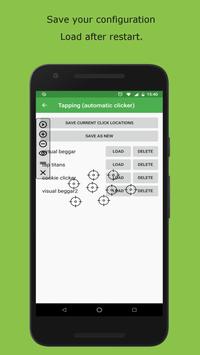
A very useful tool to help you do repetitive tasks on your android device in a convenient and simple way. You can click automatically without having the device in hand thus making a lot of tasks easier using a simple and lightweight app. First thing to do once you accept permissions is to adjust the settings as needed for your task. The frequency and duration of clicks and the length of time you want the system to run. As soon as you have made these basic adjustments you can start distributing your clicks around the entire screen. A menu bar is located on the left side of the screen where you can control the clicks before and after the process. Tap to add clicks and set them exactly where you want the click to be placed. Add as much as you need and distribute according to your needs. To remove any of them just tap the - button. One of the advantages of tapping auto clicker is that you can save the location of your clickers to continue your activity whenever you want. Using this tool you can take full advantage of your favorite games and keep them away from closing from inactivity.
Requirements
Android 7.0+
Verdict
Tapping - Auto Clicker is an Android application available under the Freeware license — the APK is 3.0 MB. We’ve catalogued it under Utilities.
At a glance
Help fellow users decide. Share your experience with Tapping - Auto Clicker.