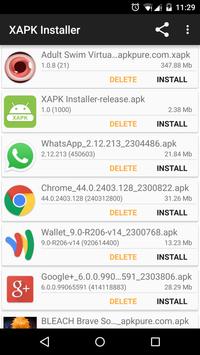
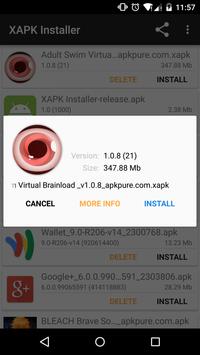
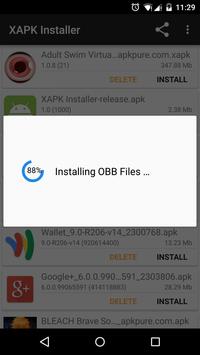
XAPK Installer makes that easier and faster than ever so ay goodbye to Android AP OBB Installing error problem.
XAPK Installer is a new file format installer for Android which helps in compressing big APK files into a smaller size which can be downloaded and accessed without many complications as it can extract the files and install it on your device. The XAPK Installer file is enough to install the App along with all the needed resources.
What is a XAPK file?
An XAPK file is a package used to install Android apps on mobile devices. It is similar to the standard .APK format, but may contain other assets used by the app, such as an .OBB file, which stores graphics, media files, and other app data. XAPK files are used for distributing apps on third-party Android app download websites.
Because XAPK files are not standard app installer packages, they must be installed manually or installed using an XAPK installer. After downloading an XAPK file, you can install the app (the APK file stored in the package) to an Android device using XAPK Installer. If you would like to manually install the additional files, you can unzip the XAPK file (which is a standard .ZIP file) and place the extracted files in the appropriate location on your device.
A drawback to delivering apps via Playstore is that the size of the APK file must be 50MB or smaller, which forces app developers to use other files (such as OBB files) to store additional graphics and media assets. Because of this limitation, some developers make their apps available from other sites besides Google Play. The XAPK format was introduced to package the APK file and OBB file together for a seamless delivery and installation process when downloading an Android app from a non-Google Play site.
Using xapk installer you an scan and preview all .apk file on your phone and SD Card
- Delete or install AP, XAP ( AP with cache data or obb file) automatically
- Download XAP, AP free online with your Android phone and tablet
Manually Installation of the XAPK
You can install the x file without any installer just by unzipping the compressed archive file.
1. Once you download the xapk file, open the File Manager App.
2. Locate the.XAPK file and rename the extension to .zip
3. Now
download Unrar App from this link.
4. In RAR App locate the .zip file and extract the files (Unzip).
5. Now copy the .obb file which may be like com.gamexxxxx.obb into the preferred location;
/sdcard/storage/emulated/0/Android/obb/com.gamexxxxx/
6. Install the APK and the App will automatically collect the resource from the Obb data file and work as intended.
Advantages of XAPK Files
- Your data in just one File.
- Large files installation.
- Less likely for the Files to be Corrupt.
- Compressed file size consuming low space and data.
- Quick installation without any resource missing issues.
How to install xapk?
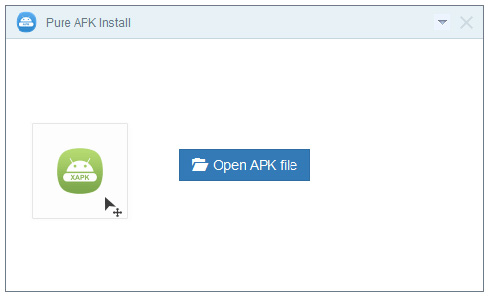
APK Install is an APK installer software for Android. With this APK installation tool you can easily install APK games and apps from PC to Android phone or tablet. It would take just one click. Xapk installer for PC allows you to install .apk files from Windows XP, Vista, 7, 8, 8.1 and 10 to Android devices.
APK Install features
-One click install apk package and OBB asset files to Android.
-Support all Android brand cellphone apk installing.(Samsung, HTC, Motorola, Huawei, LG, Lenovo, Mi, Micromax, etc).
- You can directly install XAPK files on your Android device without any error. You can also use the manual Method in some older version of Android where the direct installation may not be supported.
-APK Installer works perfectly with Windows 8.1, Windows 8, Windows 7(32/64bit), Windows XP.
- Supported on Android 2.3 and above.
Frequently Asked Questions
How to fix device connected problem?
If the Android device can't be connected, please follow the steps below to resolve the issue. Unplug your phone from computer, change another USB cable or USB port, redownload USB Driver and enable USB Debugging on the device.
How does Pure APK Install work?
APK Install just answered everything you want to know about apk installation. Download and install the software, drag and drop Android .apk, select install button to continue. Done!
How to Fix XAPK Validation Failed?
You need is to grant all the permissions to the App. Go to Settings then App/App Manager then Locate the App/Game then Grant All the Permissions to the App/Game. Clear tabs and reopen the game.
How can I report a bug?
Please submit bugs to us by clicking on the "Submit Feedback" button on the top-right of the Pure APK Install window.
How to Install XAPK Files on Android Phone
-
Download the PC installer file from here
- locate the XAPK (APK with OBB) file or APK on your PC.
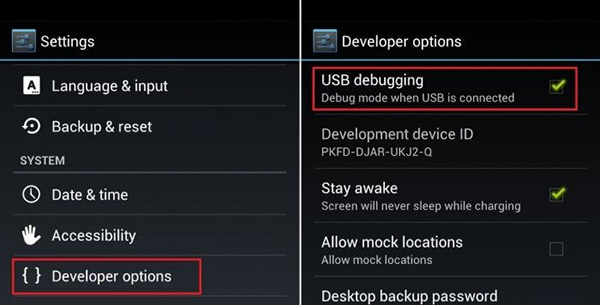
- On Android 5.x devices go to Settings > Developer Options > USB Debugging.
- On Android 4.x devices go to Settings > Developer Options > USB Debugging.
- On Android 2.x - 3.x devices go to Settings > Application > Development > USB Debugging.
- Tap "Settings, then "About Device" then on the "Build Number" button about 7 times.
- Developer Mode should now be unlocked and available in Settings > More > Developer Options
Now USB Debugging is enabled on your Android devices. Turning on “USB debugging” on your phone: means USB Debugging Mode can establish a direct connection between Android devices and your PC. USB Debugging Mode allows you to get important information about your phone.
For Samsung devices running Android 4.2.2 or later, you may need to unlock Developer Options before it is available within the Menu.
- Now plug your Android phone or tablet into your PC USB port to get connected.
- Open APK File" on your PC or Drag and drop XAPK, APK file directly to the app interface.
- Preview your App and select Android internal or external SD Card memory to install it.
- Now click "Install button" to start your XAPK/APK installation.
- It may take seconds or minutes to finish XAPK, APK installation, it depends on apk file size
- To manually copy obb file to Android, you need to and install game apk on your Android device, then Unzip the apk file and copy the .obb file into your SD card /SDCARD/storage/emulated/0/Android/obb/****/
XAPK Installer v1.4 Update
- Fixed SD Card .apk, .xapk file not found error.
- Support latest Android 6.0 Marshmallow.
XAPK Installer App Permisions
- ACCESS_NETWORK_STATE
- ACCESS_WIFI_STATE
- BIND_ACCESSIBILITY_SERVICE
- CAMERA
- FLASHLIGHT
- GET_PACKAGE_SIZE
- GET_TASKS
- INTERNET
- MOUNT_UNMOUNT_FILESYSTEMS
- READ_EXTERNAL_STORAGE
- READ_PHONE_STATE
- RECEIVE_BOOT_COMPLETED
- REQUEST_INSTALL_PACKAGES
- VIBRATE
- WAKE_LOCK
- WRITE_EXTERNAL_STORAGE
- INSTALL_SHORTCUT
- READ_SETTINGS
- BIND_GET_INSTALL_REFERRER_SERVICE
XAPK Installer is an Android application available under the
Freeware
license — the APK is 2.4 MB.
We’ve catalogued it under
Security.
Help fellow users decide. Share your experience with XAPK Installer.