Android · Free download · Productivity
SD Card Manager7.0.1
- Operating system
- Android
- File size
- 4.31 MB
- License
- Freeware
- Last updated
- Feb 16, 2026
15 downloads·1147 page views
Android · Free download · Productivity
15 downloads·1147 page views
Screenshots
In depth
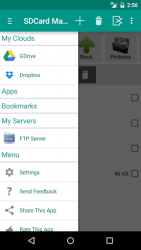
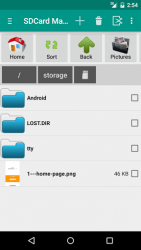
Features:
- High Performance.
- Browse files and folders
- Cut,copy and paste files and folders
- Create,rename and delete files
- Free space and used space information
- Install .apk application from sdcard
- Sorting of files and folders in list view.bl
- Compress and Extract
- Upload File to FTP Server.
- Run FTP Server on you android phone access Files/folders on PC, Browser and FTP Clients
- upload photos to FACEBOO
- Share Photos, Videos, Music, Documents, Apps with your Friends and Family over Bluetooth
- Back up Application and Share Apk via Bluetooth
- Browse system folders and files.
- Search Files and Folders.
- Install Folders short cuts on Home screen.
- Supports Both List View as well Grid View and configuration from Settings.
- List Installed Applications
- Back Up Applications(.apk) in the SD Card.
- Cloud Storage Support Google Drive and Dropbox
- Explore and manage system files and folders. Full root access for copy, delete, move and rename.
- Root Explorer requires Rooted Phone. This feature will not root your phone/tablet. If you do not have root access, then this feature is useless.
Enable/Disable this feature from Settings. Its Completely Free Feature. Language Support:
English
German
Spanish
Russian
DUTCH
Italian
Japanese
OREAN
Hindi Goal is to make easy, light weight and free tool which easily manage files SD Card.Simple File manager for all types of users(Root and Normal). Comments and suggestions for this application are welcome.
Verdict
SD Card Manager is an Android application available under the Freeware license — the APK is 4.31 MB. We’ve catalogued it under Productivity.
At a glance
Help fellow users decide. Share your experience with SD Card Manager.