In depth
A closer look at Talking Alarm Clock
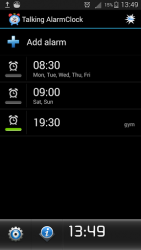
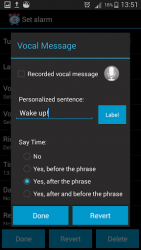
The first alarm clock that says what you want!!! Wake up with your own voice or the voice of the person you love with the record vocal function or set your -personalized sentence- and talking alarm clock will use it to wake you up. Moreover Talking Alarm Clock tells you the current time!To snooze the alarm you can simply shake the phone. Talking alarm clock is further provided with large snooze button to prevent you from accidentally turning off the alarm. If the -Talking Alarm Clock- doesn-t work, try to do this in your phone:Go to -Setting--> -Voice input and output--> -Text to speech setting-->-Install voice data-- Conflicts with other programs:- Task Manager If you use Taskmanagers apps such as -Advanced Task iller- you must put -Talking AlarmClock- on the exclusion list (ignore list) sincethese tools can kill the alarm service used by -Talking AlarmClock- compromising functionality.
Verdict
Should you install Talking Alarm Clock?
Talking Alarm Clock is an Android application available under the
Freeware
license — the APK is 4.24 MB.
We’ve catalogued it under
Productivity.
✓
Verified clean. Every Talking Alarm Clock APK on SoftLookup is scanned for malware, spyware, and adware. We re-test on every update.
Sponsored
At a glance
Talking Alarm Clock specifications
- Publisher
- Mirolunapp
- Last updated
- May 5, 2026
- License
- Freeware
- Operating system
- Android
- File size
- 4.24 MB
- Price
- Free
- Page views
- 683
Sponsored
Help fellow users decide. Share your experience with Talking Alarm Clock.