In depth
A closer look at 3D Digital Weather Clock
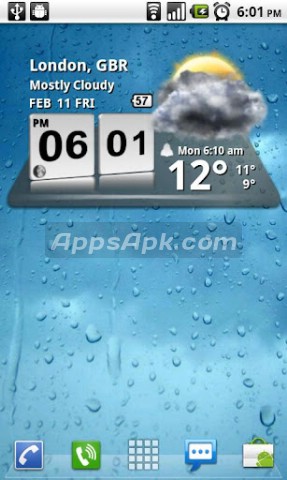
3D Digital clock widget with Calendar, Time, System info,weather - forecast A Digital Clock widget with size 4×2 It features: 12/24 hour clock +Color choice on some info displayed System Stats Information pop-up Battery icon on clock Weather - Forecast 2 Forecast layouts tap bottom right->preferences tap bottom left->System information dialog tap on weather icon->forecast tap Hour->launch anything!(set from config screen) tap Min ->launch anything!(set from config screen) Widgets on Android work a bit differently than a normal application. Unlike regular programs they don-t just install themselves in the application tray so you have to add them manually. They will not open or launch. Here-s how to add a widget on your Android home screen. STEPS HOW TO ADD A WIDGET = 1.On your Android home screen, tap any blank or-emptyarea with size 4×2 and hold down your finger. 2.An-Add to Home screenwindow will pop up. From that window, tap-Widgets. 3.Youll be presented with a list of all the installed Widgets on your Android device. 4.Select the 3D Digital Weather Clockto add to your home screen by tapping it.
Verdict
Should you install 3D Digital Weather Clock?
3D Digital Weather Clock is an Android application available under the
Freeware
license.
We’ve catalogued it under
Productivity.
✓
Verified clean. Every 3D Digital Weather Clock APK on SoftLookup is scanned for malware, spyware, and adware. We re-test on every update.
Sponsored
At a glance
3D Digital Weather Clock specifications
- Publisher
- Developer
- Last updated
- May 5, 2026
- License
- Freeware
- Operating system
- Android
- Price
- Free
- Page views
- 1189
Sponsored
Help fellow users decide. Share your experience with 3D Digital Weather Clock.