Android · Free download · Productivity
Dropbox70.2.4
- Operating system
- Android
- File size
- 58.71 MB
- License
- Freeware
- Last updated
- May 5, 2026
73 downloads·1156 page views
Android · Free download · Productivity
73 downloads·1156 page views
Screenshots
In depth
Features:
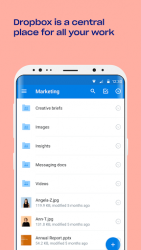
Work on files with others through shared folders
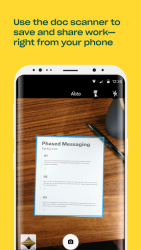
Use the document scanner to turn receipts, whiteboards, and notes into PDFs
Comment on files to share feedback with your team
Sync, share, and edit Word, Excel, and PowerPoint files We'd love to hear from you!
The pdropbox app is the official app of this popular cloud storage service that allows you to backup and synchronize all your photos and important files automatically. As a result of its advanced document sharing capabilities you can easily send all types of content from the app to any other device. In a matter of seconds. If you want to use dropbox you must have a user account. It is fortunately easy to register as you only need to enter your e-mail address to create your account. For this type of basic subscription it allows you to store up to 2gb of data in the cloud that you can manage from up to 3 different devices including android devices and pcs. If you need more storage or more devices you can buy some of the premium subscription plans which will allow you to have up to 3tb of storage for a fixed amount per month. By default dropbox will automatically backup all your photos on your android device. The photo that you take is automatically backed up to the cloud when your device is connected to a wi-fi network. You can also choose from the app's options menu whether to exclude a folder from being synchronized or if for example you also want the app to automatically back up even. You can access all of these options through the profile tab. Documents directly in the apph2pone of the most interesting features of dropbox allows you to scan all types of documents directly from the apph2. Id cards badges receipts and other documents can be scanned and converted to pdf format directly. They will be automatically synchronized in the cloud so you can access them wherever you are. If you don't have access to your android device as a result you can download your important documentation whenever you have internet access.
while using dropbox solely on your android device is very useful, when the app really shines is when you also have it installed on your pc or mac. And because by doing so you can share documents and photos very quickly. You can always access all the content you have stored in shared folders on your pc or mac and vice versa from your android device. This is particularly useful for people who travel for work as it allows them to always carry their office with them. Ppdownload dropbox if you have a dropbox account and thanks to this app you can easily manage it anytime and anywhere. And don't hesitate to create a dropbox account you get 2gb of free cloud storage to use as you wish. And a backup of all your photos is always good.
Verdict
Dropbox is an Android application available under the Freeware license — the APK is 58.71 MB. We’ve catalogued it under Productivity.
At a glance
Help fellow users decide. Share your experience with Dropbox.