PicsArt Color Paint icon

Android · Free download · Productivity

PicsArt Color Paint2.4.0

Operating system
Android
File size
12.22 MB
License
Freeware
Last updated
May 5, 2026

56 downloads·905 page views

Screenshots
See PicsArt Color Paint in action

PicsArt Color Paint screenshot 1
PicsArt Color Paint screenshot 2

In depth

A closer look at PicsArt Color Paint

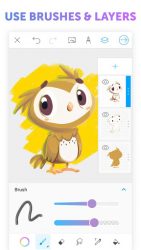
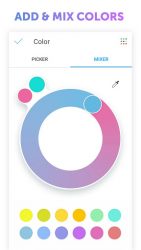
With PicsArt Color incredible digital illustrations are now easier and more awesome than ever. PicsArt Color offers a full drawing suite with immense functionality for novices and pros alike. Layers upon layers, a color mixer for any color combination you can imagine, fully customizable paint brushes, a unique symmetric drawing feature and an amazing texture brush are just some of the creative features at your fingertips (or drawing stylus). Doodle on that selfie you just took, paint breathtaking fantasy worlds or just do some picture coloring- Color is for everyone! And an intuitive interface makes sure you spend more time drawing awesome things than looking for things. From a sketch to fully polished illustrations, PicsArt Color is the only digital drawing app youll ever need.
- Symmetric drawing with rotating axis -Textured Brush- draw not only with color but with texture!-Pattern and Color Fill-Full library of customizable brushes-Color Wheel and Mixer and match any colors you want-Multiple Layers -Blending modes-Text Tool that allows you to draw and erase with text-Auto-recovery so your drawing is never lost and much more is available for free and with no pesky ads! Download PicsArt Color today and completely transform the way you draw on your tablet or phone.

PicsArt Color Paint 2.9.4

Photoart color paint is a super complete drawing app that invites you to let your imagination run free. Using a blank canvas you can start drawing and import pictures and work directly on them. The picsart color paint app just like any other professional drawing app lets you easily and comfortably work with layers of paint. You can add as many layers to your piece as you’d like, make them visible or invisible, change their opacity, blend them with other layers, transform them, and so much more.

you can also customize your pain brushes down to the slightest detail: increase or decrease the thickness and the intensity of the stroke, add or eliminate separation between the patterns, change the opacity, and much more. You can of course create your own color palette too. Pppicsart color paint is a powerful drawing tool that is as useful as giants like adobe illustrator or autodesk sketchbook. This app has enough features to turn your android phone into the perfect companion and create your best drawings yet.

Verdict

Should you install PicsArt Color Paint?

PicsArt Color Paint is an Android application available under the Freeware license — the APK is 12.22 MB. We’ve catalogued it under Productivity.

Verified clean. Every PicsArt Color Paint APK on SoftLookup is scanned for malware, spyware, and adware. We re-test on every update.
Sponsored

At a glance

PicsArt Color Paint specifications

Category
Productivity
Publisher
PicsArt
Last updated
May 5, 2026
License
Freeware
Operating system
Android
File size
12.22 MB
Price
Free
Page views
905
Sponsored

Leave a comment

Help fellow users decide. Share your experience with PicsArt Color Paint.

Download PicsArt Color Paint