In depth
A closer look at Blip Blip hourly chime
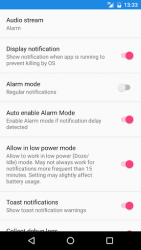
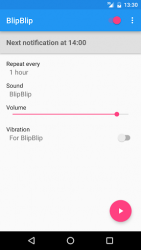
Simple time reminder, plays sounds regularly (hourly chime), but can do much more!. It can be used as a cuckoo clock or mindfulness bell- every time it rings it gives you chance to think what time it is or what you are currently doing. By default it plays short sound every hour regardless of day or time of day. It can not only beep hourly but also on shorter periods like 30 or 15 minutes. The time signal can be configured for example to limit chime time to specific hours or days, see below for full list of options. You can use it also as reminder (e.g. to drink more water or take break from computer screen) by customizing text in the notification. List of features:- play sound in regular intervals (e.g. every hour)- several sounds to choose (e.g. Casio watch beep, gong, ship-s bell, cuckoo)- enable vibration during playing sound (choose from several vibrations)- quiet hours (e.g. from 22:00 to 6:00)- quiet days (e.g. Saturday and Sunday)- display when upcoming notification will occur- light up screen when playing sound- choose audio stream (ring, alarm, media, notification)- choose ring for sound to follow phone ringtone (choose this if you don-t want sound in silent mode)- lower notification sound volume compared to chosen audio stream (using slider)- change audio stream sound volume using hardware volume keys in the app- continue working after reboot or app update- option to disable while music, video or game is playing on device- disable notification during phone call- change displayed text in a notification- optionally vibrate on Android Wear- no ads Battery optimization modes or apps warning.Please note that if the app stops working unexpectedly it may be caused by some phone function or app which stops apps to increase battery life (power saving, battery optimization, eco, task killers, etc.). In such case, please disable it for BlipBlip for the app to function correctly. Note to Samsung users:On some devices Alarm mode needs to be enabled in Reliability Settings to fix issue with notifications being late by several minutes (in which case they are ignored).Instead of Alarm mode you can also try to use -Light up screen on notification- option. If you have some problem please contact us by using -Report problem- from the app, describe your problem and send to forward logs and configuration from your device.
Verdict
Should you install Blip Blip hourly chime?
Blip Blip hourly chime is an Android application available under the
Freeware
license — the APK is 1.48 MB.
We’ve catalogued it under
Productivity.
✓
Verified clean. Every Blip Blip hourly chime APK on SoftLookup is scanned for malware, spyware, and adware. We re-test on every update.
Sponsored
At a glance
Blip Blip hourly chime specifications
- Publisher
- Paweإ‚ Nadolski
- Last updated
- May 4, 2026
- License
- Freeware
- Operating system
- Android
- File size
- 1.48 MB
- Price
- Free
- Page views
- 1041
Sponsored
Help fellow users decide. Share your experience with Blip Blip hourly chime.