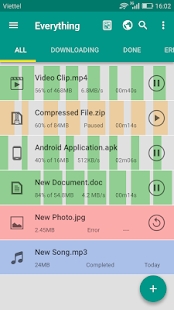
Download Accelerator Plus is a powerful speed booster, an advanced download manager, a must-have tool for Android devices.
Download Accelerator Plus for Android (aka: ADA+ or DAP) is not only a powerful download speed booster, but also an advanced download manager. It-s a must-have tool for your Android phone/tablet if you want to quickly download files from the Internet. Now you can say goodbye to long waiting.
Why choose us?
– It-s total FREE, with unlimited access to all features, unlimited download, unlimited file size.
– It-s tiny (about 1.3 MB file size) but rich of capability.
– Support all file types: archive files (RAR, ZIP, -), music files (MP#, OGG, WAV, -), video files (WMV, MP4, FLV, AVI-), documents ( DOC, PPT, XLS-), programs (AP -) .
– Support multiple web browsers, including: default web browser of android, chrome, firefox
– Built-in web browser which supports multiple tabs, history and bookmarks. It makes download task easier by automatically catching links of videos or music from your favorite websites.
– Boost downloading speed by splitting files into multi parts and using multithread download with buffering size optimization.
– Include pause and resume feature with supported links.
– Smart error handling feature which helps prevent interrupting download threads.
– You can add many URLs to download simultaneously or store them in a queue for later download.
– Auto-catch download links whenever you copy to clipboard or open a downloadable link.
– You can refresh dead links with new ones to continue your downloading
– Downloading large files from file sharing services becomes more stable and reduces failure rate
– Manage downloaded files: sort by name, size, type, order and categorize by type.
– Work in the background and even when the phone screen is off.
– Notifications with download progress.
– Customize file name and download location.
– Detailed information on speed, size, time-
– User-friendly and easy-to-use design: material design, interface customization and themes.
– Detailed in-app instruction and rich context menu.
How to use?
To download general files:
– Tap the Add button and insert the URL link.
– Or you can click the file link and select to download with Download Accelerator Plus
To download music or video :
– Tap the Browser icon to open built-in browser
– Navigate to your favorite website and play the video/music
– The application will automatically catch the download link
– You can see a list of available download files in the left menu side
Please note that DOWNLOADING FROM YOUTUBE IS NOT SUPPORTED due to their terms of services
To refresh a dead link
– Method 1: add a new URL as usual. The app will automatically find the broken link in download list which is identical with the new one. You can select the option to replace and continue download progress or start downloading as a new file
– Method 2: long click on the failed task. Then select to refresh link in the context menu appearing. Enter the new URL to replace the old one
Try it out – a real download manager and watch your downloads complete in no time. Any suggestions or feedbacks are always welcomed. Please drop us a message at support-rubycell.com.
Download Accelerator Plus 20211021
A download manager for android that lets you manage all the downloads you make from your android device. This is so simple that you won't even have to think about it. Navigate just as you would normally using its built-in browser which makes downloading any file much easier. When downloading a file is started a window pops up asking you in which folder you want to save the file and with what name. It's important to remember that download accelerator plus does not let you download anything you wouldn't normally be able to with your standard browser no youtube videos or anything like that. You can still manage your downloads from your android device regardless of the file type. It is a good download manager which allows you to download multiple files simultaneously and above all have more control over what you download from your android device.
Download Accelerator Plus is an Android application available under the
Freeware
license.
We’ve catalogued it under
Productivity.
Help fellow users decide. Share your experience with Download Accelerator Plus.