In depth
A closer look at TCL nScreen Pro
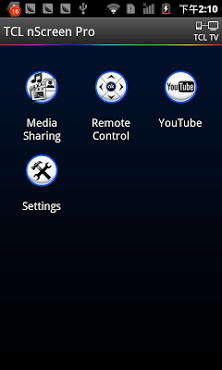
This is a free app. TCL nScreen Pro help to connect your smart phone to your smart TV through WI-FI, then you can show the video / Music / Picture from smart phone to smart TV with your family - friend , and you can use smart phone as a remote control unit to operate TV through this app. This app will help you take full advantage of your TV-s big screen and good sound effect. This app should be installed to android smart phone. Main Features: 1. Media sharing: Simply transfer your phone-s photo, music and video to your Smart TV to display or play, so you can take advantage of your TV-s big screen. 2. TV Remote control: Allows controlling your smart TV simply over the local network. your phone can act as a Touch pad or TV Remote(IR Remote). 3. YouTube video shared to smart TV. How to connect your smart phone to your smart TV: 1. Your phone and TV should connect to the same wilreless router, be sure to keep them in the same local network. 2. This app was only tested for TCL SmartTV. Theoretically, it can be used for other TV which support DLNA. 3. TV Remote Control function doesn-t work for non-TCL smart tv. Media Share works for most of SAMSUNG, LG, SONY, Toshiba Smart TV. 4. This app can works with the following SmartTVs, If this app is ok for you, please response your SmartTV-s Model name, these info will help other users. Support non TCL models (provided by users, not tested by developer): SAMSUNG 6400, SAMSUNG 40 6203 GXD LG 47LM, LG 47LW5700, LG 42LN5710, LG 42LW573S,LG lb652v,LG PB6600,LG 47LM6400 Sony BRAVIA, Sony Xperia,Sony Z1 lzh620 Details step of media sharing: 1.Click-TCL nScreenon smart phone. Connect smart phone with smart TV via same Wi-Fi; 2.Click-Media Sharingto browse media files; 3.Send media to TV to playback. (with one of the following options) a)Drag - Drop folder/file to the TV icon on top of the screen; b)Swing phone towards TV to launch the first file; c)Play the media on phone and click the TV sharing icon; 4. While playing on TV, shake the phone to play previous or next file Details step of Remote control 1. Click-TCL nScreenon Smartphone. Connect Smartphone and Smart TV to the same Wi-Fi router; 2. Click-Remote Controlto operate Smart TV.
Verdict
Should you install TCL nScreen Pro?
TCL nScreen Pro is an Android application available under the
Freeware
license — the APK is 7.2M.
We’ve catalogued it under
Productivity.
✓
Verified clean. Every TCL nScreen Pro APK on SoftLookup is scanned for malware, spyware, and adware. We re-test on every update.
Sponsored
At a glance
TCL nScreen Pro specifications
- Publisher
- Developer
- Last updated
- Feb 7, 2026
- License
- Freeware
- Operating system
- Android
- File size
- 7.2M
- Price
- Free
- Page views
- 1187
Sponsored
Help fellow users decide. Share your experience with TCL nScreen Pro.