Android · Free download · Productivity
DU Privacy Vault2.6
- Operating system
- Android
- File size
- 2.62 MB
- License
- Freeware
- Last updated
- Jan 29, 2026
58 downloads·1261 page views
Android · Free download · Productivity
58 downloads·1261 page views
Screenshots

In depth
ey features of DU Privacy Vault:
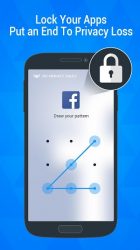
App Lock: Lock any app in your smartphone. Lockdown your apps and protect your privacy.
Private Image: Encrypt and hide your private photos, lock them with your password
Private Video: Encrypt and hide your private videos. We can also help you encrypt and hide your videos in the social media platforms, such as Facebook, LINE, Instagram, What'sApp. The best Vault which can help your encrypt your media files!
Lock Cover: Disguise your lock screen as something else. 'Fake App Crash' and 'Fingerprint' screen cover are now supported, and more covers will coming soon.
Prevent Uninstall: After you turn on the Prevent Uninstall feature, other people won't be able to delete DU Privacy Vault from your phone without your authorization. Protect your privacy and secret! FAQ:
How can I lock app?
It's simple, open the app lock function and just click the lock button of the app you want to lock.
How can I hide my photo/video?
Open the Private Image/Private Video function, select your private photo/video and press "Hide".
How can I change my password?
Open DU Privacy Vault, go to Settings, Password Settings, and Change Password.
What should I do if I forgot my password?
You can use your google play account to reset your unlock pattern
Verdict
DU Privacy Vault is an Android application available under the Freeware license — the APK is 2.62 MB. We’ve catalogued it under Productivity.
At a glance
Help fellow users decide. Share your experience with DU Privacy Vault.