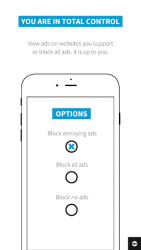
Adblock Browser is an easy to use, customizable web browser that gives you control over your mobile browsing experience. Block ads, browse faster, save battery life - data. Quick, safe - private. -Adblock Plus is forcing the ad industry to re-think its core proposition-- MediaPostAdblock Browser for iOS and Android makes it easy for non-technical people to reduce the number of mobile web ads they see and protect themselves from known malware sites. - ExtremeTechBless Adblock for trying to keep that advertising from ruining the web- Gizmodo From the team behind Adblock Plus, the most popular ad blocker for desktop browsers, Adblock Browser allows you to take back control of your mobile browsing experience. Focusing on privacy, security and user control, Adblock Browser offers the following benefits: A built-in ad blocker. Block annoying and intrusive ads, such as ads on videos, saving data and battery life in the process. By default, respectful ads that meet the strict criteria of the Acceptable Ads initiative are shown, which helps support great content creators. Want to block all ads? No problem. Easy to use options allow you to control what you see. Secure browsing. Blocking intrusive ads minimizes the risk of-malvertisinginfections. Recommended by Stanford University, UC Santa Barbara and the Electronic Frontier Foundation, Adblock Browser makes protecting yourself from malware easy. Enhanced privacy. With a few simple taps you can disable tracking. Adblock Browser lets you browse the web anonymously and stop companies from tracking your online activity. Added user control. You choose to disable tracking, block all or some ads, or even choose which search engine you want to use. But the control doesnt stop there. Adblock Browser allows you to add filter lists, whitelist websites and disable social media buttons and anti-ad blocking messages. Ease of use. Adblock Browser is intuitive, offers smooth scrolling and has easy bookmarking and keyboard features. Changing any setting takes only a few taps.
Verdict
Should you install Adblock Browser for Android?
Adblock Browser for Android is an Android application available under the
Freeware
license — the APK is 41.95 MB.
We’ve catalogued it under
Productivity.
✓
Verified clean. Every Adblock Browser for Android APK on SoftLookup is scanned for malware, spyware, and adware. We re-test on every update.