In depth
A closer look at ShakeLock No ads
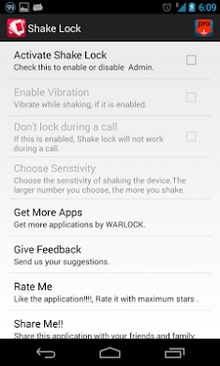
ShakeLock (Reformed) Lock the screen with ease. You can lock the screen by just shaking your device.This is very simple and light weight application, with no ads.With this application you don-t need to press the power button to lock the screen. Just install the application and activate it. Device admin(this is just for the permission to lock the screen, nothing else) and select the suitable sensitivity and the application is ready for use. Just exit the application and shake it. WHY THE UNLOC FEATURE IS NOT PROVIDED- As per the requests of the users to add unlock feature,we decide to write here why we are not providing this feature. If we add this feature then it will drain your battery very fast, because the service will running after the screen lock and as per our policy to provide good user experience this feature is not provided. It is for your own good ,for saving the battery life. HOW TO UNINSTALL- If you want to uninstall the application you need to Deactivate Shake Lock from the application. Or you can deactivate it from settings > security > Device administrators > ShakeLock (Uncheck it) and uninstall it normally.
Verdict
Should you install ShakeLock No ads?
ShakeLock No ads is an Android application available under the
Freeware
license — the APK is 181k.
We’ve catalogued it under
Productivity.
✓
Verified clean. Every ShakeLock No ads APK on SoftLookup is scanned for malware, spyware, and adware. We re-test on every update.
Sponsored
At a glance
ShakeLock No ads specifications
- Publisher
- Developer
- Last updated
- Feb 11, 2026
- License
- Freeware
- Operating system
- Android
- File size
- 181k
- Price
- Free
- Page views
- 870
Sponsored
Help fellow users decide. Share your experience with ShakeLock No ads.