In depth
A closer look at Volume Locker
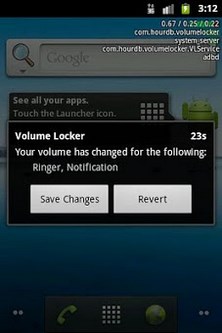
This app helps prevent against accidental volume changes by confirming the change you made, by either tray notification or a pop up. If you don-t approve the change, the volume will be reset within a set amount of seconds. Great for people who accidentally changes their volume, have small kids, don-t want their phone to go off accidentally in meetings, or even have apps which modify the sound settings a lot. It works with most profiling apps: Locale - Tasker (Locale Audio Update Notifier plugin necessary), Timeriffic, Setting Profiles, Ring Toggle, AAM, Bedside, etc. By setting the timeout to instant, the locked volumes will revert instantly without prompting. The camera permission is to prevent Volume Locker from popping up due to the shutter sound on some devices. This app doesn-t take pictures, it just detects if the camera is in use. Features: unobtrusive, auto-start, call friendly, multiple volume lock Exclude from task killer! Regarding the Samsung Galaxy S: If VL doesn-t work or save your settings properly, it-s due to the upgrade to 2.2.1 breaking the settings permissions. Reinstalling won-t fix it, the only fix is resetting the device. This is a Samsung issue and not related to VL. Ring Control Audio Guard Manager
Verdict
Should you install Volume Locker?
Volume Locker is an Android application available under the
Freeware
license.
We’ve catalogued it under
Productivity.
✓
Verified clean. Every Volume Locker APK on SoftLookup is scanned for malware, spyware, and adware. We re-test on every update.
Sponsored
At a glance
Volume Locker specifications
- Publisher
- Developer
- Last updated
- May 5, 2026
- License
- Freeware
- Operating system
- Android
- Price
- Free
- Page views
- 910
Sponsored
Help fellow users decide. Share your experience with Volume Locker.