In depth
A closer look at Next Launcher 3D Note Widget
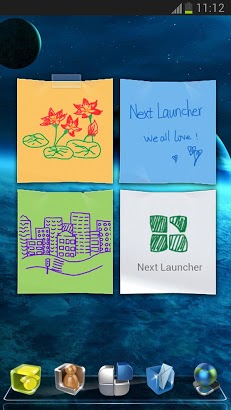
Next Note Widget is a good helper to manage your schedules and notes. You can use note style to quickly write down your thoughts. You can also use doodle style to record your plan by just simply draw a picture. Rich and interesting animation, you-ll love it! Available Size:- 2×2 Actions:- text input- Graffiti painting- Change skin- Empty the note Hint:- Please install more than v2.03 of Next Launcher before using Next Note Widget. How to add Next Widgets on your home screen?- Long press on your home screen in Next Launcher. Press the Next Widget option and choose the widget you like. Make sure you have enough room for the widget. If you encounter any problems or have any suggestions for our Next Launcher, please do not hesitate to tell us.
Verdict
Should you install Next Launcher 3D Note Widget?
Next Launcher 3D Note Widget is an Android application available under the
Freeware
license — the APK is 1.8M.
We’ve catalogued it under
Productivity.
✓
Verified clean. Every Next Launcher 3D Note Widget APK on SoftLookup is scanned for malware, spyware, and adware. We re-test on every update.
Sponsored
At a glance
Next Launcher 3D Note Widget specifications
- Publisher
- Developer
- Last updated
- Feb 14, 2026
- License
- Freeware
- Operating system
- Android
- File size
- 1.8M
- Price
- Free
- Page views
- 905
Sponsored
Help fellow users decide. Share your experience with Next Launcher 3D Note Widget.