In depth
A closer look at My Work Clock
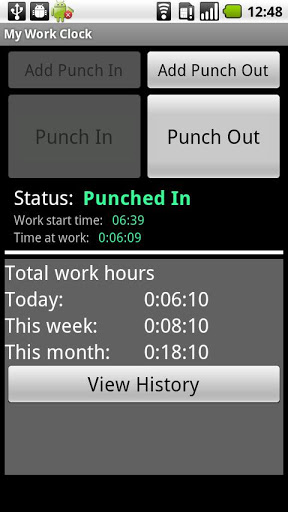
Simple punch-in/punch-out clock & widget for tracking the time at work.
Features (very partial list):
- Overtime support
- Multiple jobs support
- Calendar update [Job Setting] add records to the calendar (its recommended to open a separate calendar for -My Work Clock). ONE WAY-SYNC ONLY.
- Punch in/out directly from the widget
- Quick day, week & month information
- Simple reports
- Send to mail as CSV
- Add/remove/edit records
- Multiple overtime and report periods: daily, weekly, bi-weekly, monthly and more.
NOTES:
- If the widget stops updating: make sure the application appears in your task killer -white list.
- No move-to-SD option: widgets do not work when an app is on the SD. We got many error reports from users so we disabled this option.
Required permissions reasoning:
-. READ CALENDAR EVENTS PLUS CONFIDENTIAL INFORMATION
-. ADD OR MODIFY CALENDAR EVENTS AND SEND EMAIL TO GUESTS WITHOUT OWNERS NOWLEDGE
Required for Google calendar sync
-. MODIFY/DELETE SD CARD CONTENTS
Required to save CSV before sending by e-mail backup.
-. FULL INTERNET ACCESS & VIEW NETWOR STATE
Required for bug report, analytics & ads.
Verdict
Should you install My Work Clock?
My Work Clock is an Android application available under the
Freeware
license.
We’ve catalogued it under
Business.
✓
Verified clean. Every My Work Clock APK on SoftLookup is scanned for malware, spyware, and adware. We re-test on every update.
Sponsored
At a glance
My Work Clock specifications
- Publisher
- Developer
- Last updated
- Jan 25, 2026
- License
- Freeware
- Operating system
- Android
- Price
- Free
- Page views
- 1181
Sponsored
Help fellow users decide. Share your experience with My Work Clock.