In depth
A closer look at Countdown Timer
Countdown Timer makes taking time easy and fun. Just swipe and go!! Countdown Timer is extremely easy to use, quick, and reliable. With a handy widget, it is a great addition to your everyday gear. Countdown Timer is designed for short intervals, and NOT designed to count down to a specific date, nor count days. Countdown Timer is best as a cooking timer, public speaking timer, great for exercise, games, sports, tests, naps, night sleep, parking, etc (anything from 1 second to 99 hours). . . . And it-s totally FREE with no ads, no spam and no special permissions! Beautiful and robust timer. I use times for all sorts of things, this is one of the prettiest I have seen.
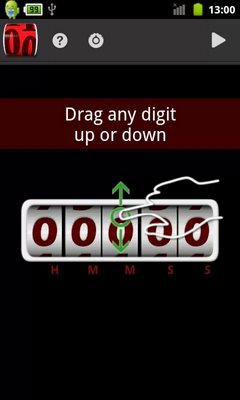
- selected App of the Day March 7, 2013 by DroidOfTheDay (DotD) Instructions: Swipe h:mm:ss digits independently to set any time period- Start to count down the seconds to zero- Get an alarm Features:- App Widget supported . . . Minimalist and elegant 2×1 design . . . Quick start any of 5 previous runs directly from the widget . . . Updates only when running and the screen is on- to save battery. . . . Option to select update frequency: 1 sec, 1 min (new default) or disabled ? Very reliable . . . Runs in the background . . . Wakes up the device if needed . . . Continues after boot . . . Survives most task killers - battery optimizers (Not all- exclude me just in case) . . . Warns you when your ringtone is missing (ie. was on SD) or alert volume level is low . . . Battery efficient: Not eating battery when not visibly running . . . and more- Fun and Easy to use . . . Intuitive swipe interface . . . Smooth rolling wheel animation . . . Tactile feedback when wheel is rolling . . . Set any time from 1 second to 100 hours . . . Set time of day for alarm (ideal for alarm clock or new years day) . . . ?NEW? Set a label to any history item (on the Rollback Menu), using long click . . . Optional Rollback button: to select one of the 5 previous runs (enable from Settings) . . . ISS (keep it simple..) . . . See only what you need, when you need it . . . Easy enough for technophobes, and for all ages (5-120). . . . Ergonomic- Cool to run . . . Smooth scrolling animation . . . Big digits when in landscape. . . . eeps screen on (If you want - battery >10%) . . . Animated Notification Bar. . . . Pixel perfect graphics, for all screen size, from small to tablet. . . . Progress bar in percent % . . . Optional Early Warning notification (Enable it in settings).
- Cool when time is up . . . Plays any notification or alarm sound on your device . . . Vibration selection! 4 patterns you can select from, or no vibration. . . . Turns on the screen for the alarm . . . Easy to dismiss, it won-t keep beeping against your will . . . Tap alarm screen to hush for a few minutes (for the snooze duration) . . . Count down than up (past due time). . . . Snooze button on the alarm screen. Can be hidden (in Settings). . . . Long press Snooze to re-open the app to set any new time . . . Optional Rollback button (Enable in settings).
- Many more delightful features, without adding complexity. + Absolutely FREE!!! + No ads or spam of any kind
Verdict
Should you install Countdown Timer?
Countdown Timer is an Android application available under the
Freeware
license.
We’ve catalogued it under
Productivity.
✓
Verified clean. Every Countdown Timer APK on SoftLookup is scanned for malware, spyware, and adware. We re-test on every update.
Sponsored
At a glance
Countdown Timer specifications
- Publisher
- Developer
- Last updated
- May 5, 2026
- License
- Freeware
- Operating system
- Android
- Price
- Free
- Page views
- 1187
Sponsored
Help fellow users decide. Share your experience with Countdown Timer.