In depth
A closer look at Ebooka PDF Viewer
Book and Document Reader with PDF and DjVu support for comfortable reading.
If you are looking for a good PDF reader, stop here, you have found it.
It does what you expect it to do. You can easily lay down and read pdf books and documents with this app.
The amazing enhancement dims your screen in some way that it doesnt hurt your eyes.
Easy to set and keep scrolling. The best functional from all readers.
Functional:
1) Read mode and control mode (single tap to switch)
2) Fixate pages by width, saved on scroll
3) Search in books
4) Table of content
5) Night Mode
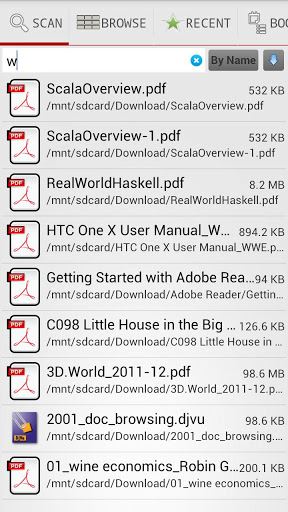
6) Search ALL books (PDF, DjVu) on device
7) Next Page or scroll pages by tap screen
8) Full screen mode
9) Support e-reader keys like Nook, indle, Sony
10) File navigation
11) Recent Books
12) Light and black theme
13) Screen orientation: Portrait, Landscape, Automatic
14) Text Bookmarks for page
15) Links History, back to page
16) Crop borders
17) Automatic Scroll
18) Swipe pages in lock mode.
Verdict
Should you install Ebooka PDF Viewer?
Ebooka PDF Viewer is an Android application available under the
Freeware
license.
We’ve catalogued it under
Productivity.
✓
Verified clean. Every Ebooka PDF Viewer APK on SoftLookup is scanned for malware, spyware, and adware. We re-test on every update.
Sponsored
At a glance
Ebooka PDF Viewer specifications
- Publisher
- Developer
- Last updated
- Jan 23, 2026
- License
- Freeware
- Operating system
- Android
- Price
- Free
- Page views
- 979
Sponsored
Help fellow users decide. Share your experience with Ebooka PDF Viewer.