In depth
A closer look at Apps Locker
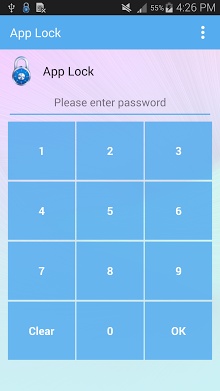
App lock is security tool which helps you to protect your phone from annoying people by locking your applications from public access, only you will be able to unlock them again. With app lock you can lock your applications using either PIN or lock pattern. This application is a very strong and useful tool for protecting you applications. You can enable or disable the lock service, you can switch between text password lock mode and lock pattern mode. Using app lock you can protect your privacy and keep your phone more personal. Frequently asked questions: 1- How to change password? Open app lock, hard menu or soft menu button, Settings, Change password or change lock pattern. 2- How to stop other people uninstall the application? Please enable-uninstalling preventionin app lock settings, then only authorized people can uninstall it using the password. 3- How to uninstall the application? Please disable-uninstalling preventionin app lock settings, then only authorized people can uninstall it using the password. 4- I forgot my password How I can reset it? Open app lock, If you are using pattern lock, please change to text password lock from menu options then select-Reset passwordand answer the security questions, If you had not set the security question, send me an email and I will send you a master key to open the app and change the password.
Verdict
Should you install Apps Locker?
Apps Locker is an Android application available under the
Freeware
license — the APK is 2.3M.
We’ve catalogued it under
Security.
✓
Verified clean. Every Apps Locker APK on SoftLookup is scanned for malware, spyware, and adware. We re-test on every update.
Sponsored
At a glance
Apps Locker specifications
- Publisher
- Developer
- Last updated
- May 5, 2026
- License
- Freeware
- Operating system
- Android
- File size
- 2.3M
- Price
- Free
- Page views
- 1010
Sponsored
Help fellow users decide. Share your experience with Apps Locker.