
Android · Free download · Security
OpenVPN Connect1.1.27
- Operating system
- Android
- File size
- 3.09 MB
- License
- Freeware
- Last updated
- May 5, 2026
57 downloads·1011 page views
Android · Free download · Security
57 downloads·1011 page views
Screenshots
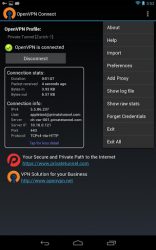
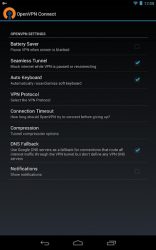
In depth
Features:
- Supports Ice Cream Sandwich, Jelly Bean and higher. Does NOT require a rooted device.
- Easily import .ovpn profiles from SD card, OpenVPN Access Server, Private Tunnel or via a browser link.
- Improved power management preferences setting allows VPN to pause in a low-power state whenever screen is blanked or network is unavailable.
- Android eychain integration OpenVPN profiles may reference a cert/key pair in the Android keychain.
- Supports hardware-backed keystores (such as on the Nexus 7)
- Support for multi-factor authentication using OpenVPN static and dynamic challenge/response protocols.
- Full IPv6 support (at both the tunnel and transport layer)
- Uses mbedTLS (not affected by Heartbleed issue)
In order to allow you to use all the features provided by the original open source program on android devices popenvpn connect is the official openvpn app. It allows you to manage any virtual private network from your android device as you would from the computer with the desktop application. There is only one thing you need to do. Ovpn network using a sd card the openvpn access server a private tunnel or a browser link. A few of the most notable features of openvpn connect include its excellent battery control function that switches to a low-consumption mode every time the screen is turned off or detects connection problems. It's also able to save energy by doing this. Other features of this android version include polarssl support for ipv6 and integration with android keychain. It's an interesting tool for openvpn users who can make sure they always have a great portable version of the program with them.
Verdict
OpenVPN Connect is an Android application available under the Freeware license — the APK is 3.09 MB. We’ve catalogued it under Security.
At a glance
Help fellow users decide. Share your experience with OpenVPN Connect.